(7% discount is applied at checkout)
Cart is empty
Your go-to destination for cutting-edge server products
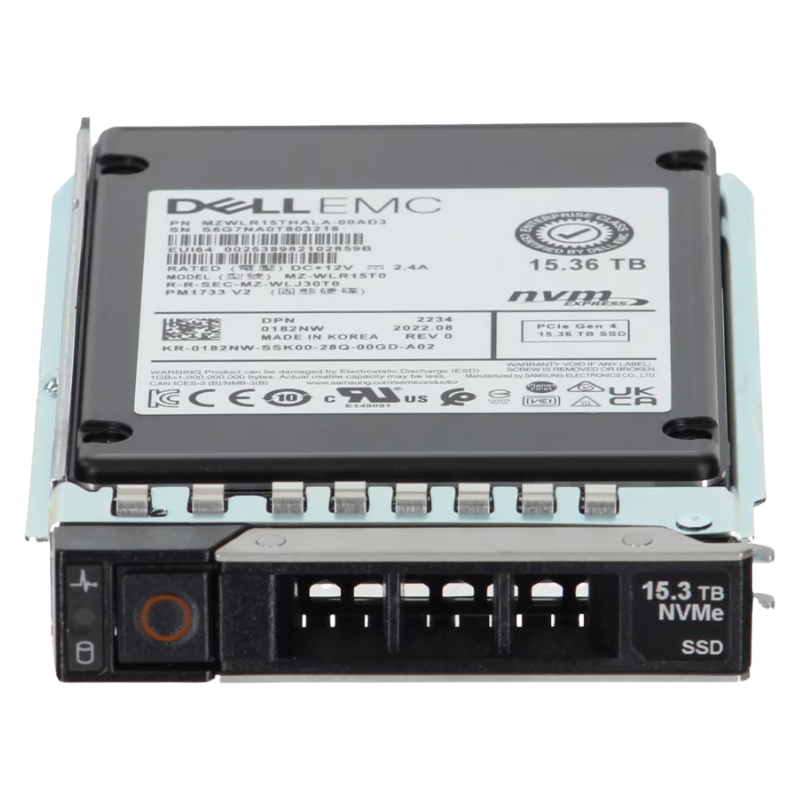


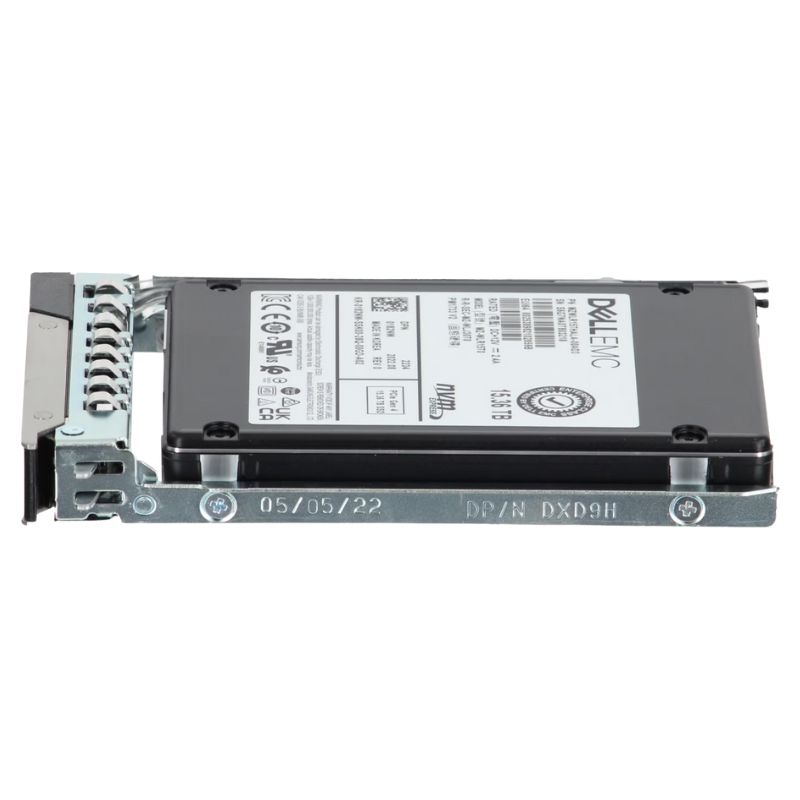
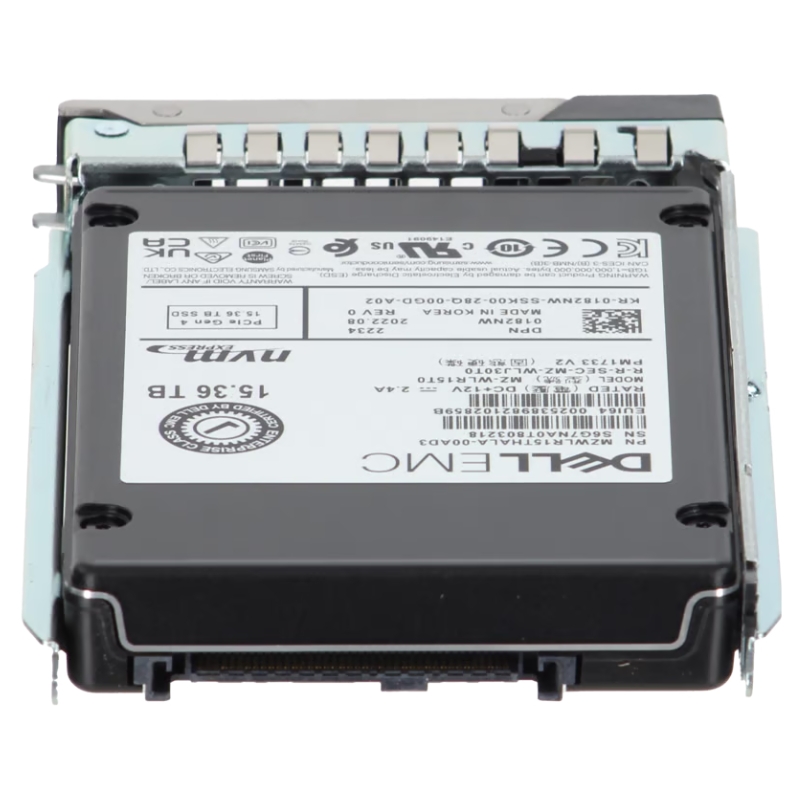
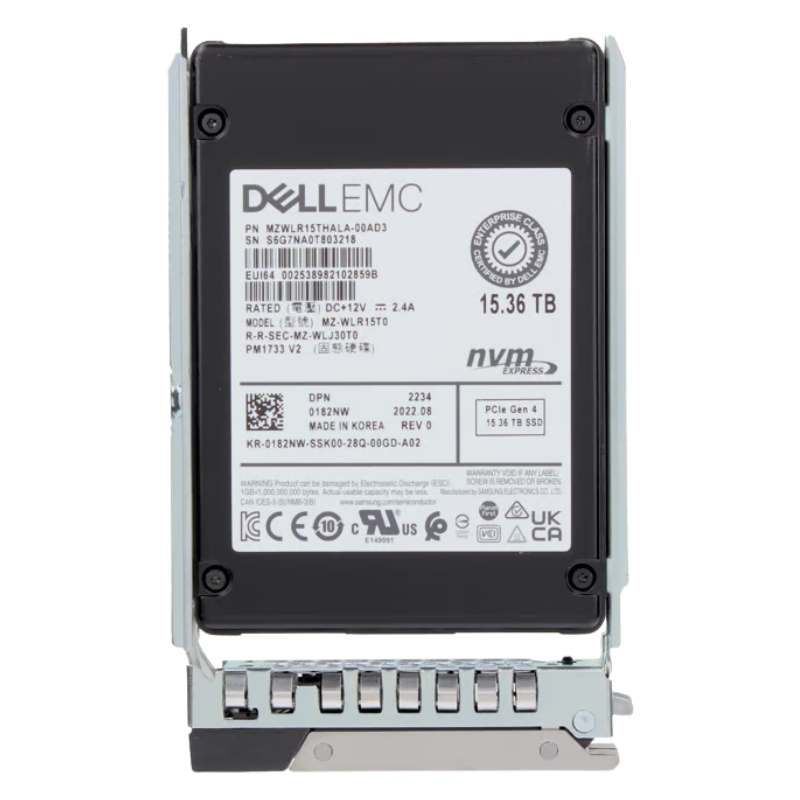
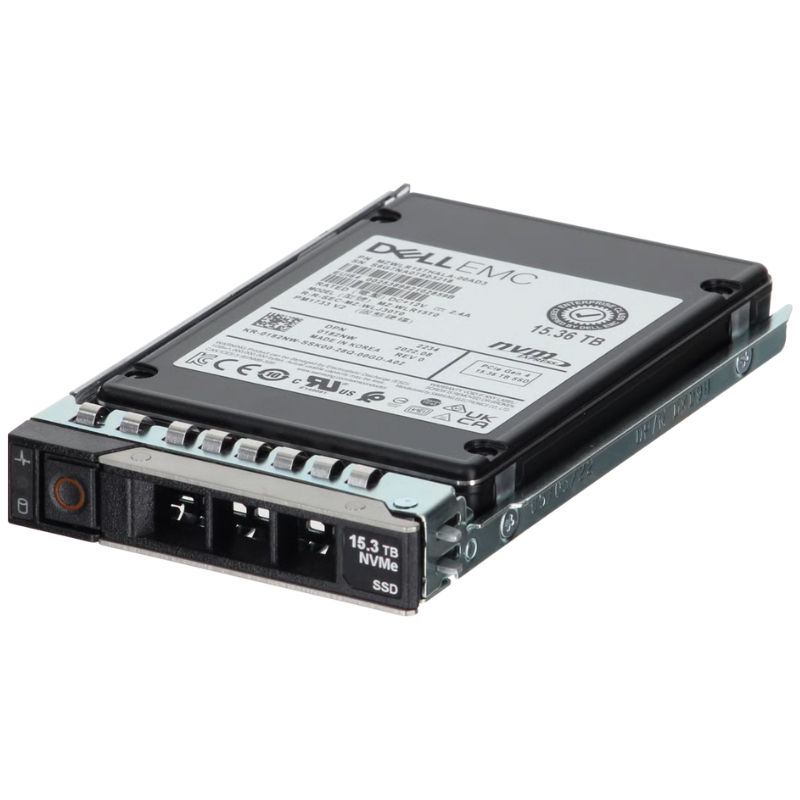
Dell 400-BTKP 15.36tb PCIe Gen4 NVMe 2.5inch U.2 Read Intensive 1dwpd Enterprise Solid State Drive. New Sealed in Box (NIB) with 1 year Warranty
The DELL 15.36TB PCIe Gen4 NVMe 2.5-Inch U.2 Solid State Drive is a powerful, high-capacity storage solution designed to deliver outstanding read performance for data-driven workloads. Equipped with a secure tray, this enterprise-grade SSD is fully compatible with Dell PowerEdge 14G, 15G, 16G, and 17G servers, making it an ideal choice for scalable business environments.
With an impressive 15.36TB capacity, it supports businesses that require large-scale data storage. The read-intensive endurance rating ensures reliability for applications with frequent read operations but lower write demands.
This SSD is designed for seamless integration with multiple generations of Dell PowerEdge servers, including:
The Dell 400-BTKP 15.36TB PCIe Gen4 NVMe 2.5-inch U.2 Read Intensive 1 DWPD Enterprise Solid State Drive sits in a premium category of high-capacity, data center–grade storage designed for predictable performance, low latency, and exceptional reliability in modern server environments. This category brings together state-of-the-art Gen4 NVMe throughput, a proven U.2 2.5-inch form factor, and a read-intensive endurance profile tuned for large-scale analytics, content delivery, virtualization, and cloud-native applications where reads far outweigh writes. Buyers select these drives to consolidate storage, reduce rack footprint, accelerate application response times, and streamline fleet management with Dell’s OpenManage ecosystem.
Built on PCIe Gen4 x4, the Dell 400-BTKP class of drives significantly increases bandwidth versus Gen3 devices, enabling higher sequential read throughput and more parallelism for mixed operations. The NVMe protocol removes legacy SCSI overhead, offering streamlined command sets and deeper queues for efficient CPU utilization. In high-density PowerEdge environments, these drives help saturate east-west data flows, improve storage fabric efficiency, and keep application pipelines fed without bottlenecks.
The U.2 2.5-inch form factor standardizes front-access hot-swap serviceability—essential for minimizing downtime. Tool-less carriers, status LEDs, and standardized backplanes allow administrators to replace a drive quickly, update firmware in-place, and maintain consistent airflow patterns within the chassis. Compared with M.2 or EDSFF in some configurations, U.2 provides a familiar, widely supported path to NVMe adoption in both new and transitional infrastructures.
“Read-intensive” in enterprise parlance denotes workloads where read I/O makes up the majority (often 70–95%+) of total operations. The 1 DWPD endurance rating balances cost and durability, ensuring the drive can handle sustained daily write cycles across its warranty term while staying optimized for read-heavy patterns. This makes the category attractive for analytics dashboards, content repositories, VDI boot storms, and large-scale search indexes where the write traffic is steady but not extreme.
Devices classed like the Dell 400-BTKP incorporate enterprise firmware tuned for consistent latency, predictable garbage collection, and stable QoS. Features typically include end-to-end data path protection, power-loss protection capacitors, SMART telemetry, secure erase functions, and SED (Self-Encrypting Drive) options where applicable. Integration with Dell OpenManage, iDRAC, and OMSA aids lifecycle management—alerting administrators to wear levels, temperature thresholds, and firmware status for proactive maintenance.
In VMware, Hyper-V, KVM, and containerized platforms, storage latency directly impacts consolidation ratios and user experience. The 15.36TB Gen4 NVMe U.2 profile enables dense, high-performance datastores with rapid VM boot, fast snapshot operations, and responsive thin-provisioned volumes. Administrators can reduce the number of disks per host while retaining excess capacity for new tenants and dev/test environments.
Read-intensive spikes—such as morning boot storms—benefit from the drive’s strong sequential and random read behavior. VDI profiles see faster desktop provisioning, quicker application launch times, and smoother patch cycles. Paired with memory ballooning and deduplication at the hypervisor or storage layer, the category improves user-perceived performance without overspending on higher-DWPD media.
Analytics frameworks and search engines (e.g., distributed full-text or time-series platforms) frequently read indexed data sets far more than they write them. The 15.36TB footprint helps keep active indices on NVMe, dramatically shrinking query latency. In content delivery and media streaming nodes, high read throughput and low tail latency ensure smoother user experiences while maintaining efficient CPU utilization on edge or origin servers.
Microservice architectures thrive on predictable, low-latency I/O. The Gen4 NVMe pathway accelerates API response chains, especially when services depend on metadata or session stores. As a backing tier for object storage gateways, reverse proxies, or shard-aware caches, the drive class offers excellent read QPS performance at a favorable cost per TB, allowing teams to right-size cache persistence and reduce cache misses that fall through to slower backends.
Many production databases exhibit read-skewed traffic—heavy point lookups, analytics joins, or range scans punctuated by periodic write bursts for ingestion and archiving. The 1 DWPD endurance class remains appropriate when write amplification is managed through schema design, log-structured engines, and disciplined compaction schedules. The result is stable performance at scale without the price premium of write-intensive SKUs.
Enterprise NVMe firmware strives for consistent tail latency, not just peak IOPS. In multi-tenant environments, predictable 99th and 99.9th percentile latency is more meaningful than absolute maximum throughput. This category’s firmware tuning, coupled with power-loss protection and robust ECC, helps maintain QoS even under mixed read/write scenarios or during background tasks like wear leveling and garbage collection.
NVMe’s deep queues and command set allow the OS and hypervisor to schedule many concurrent I/O operations with minimal overhead. PCIe Gen4 x4 provides ample bandwidth so administrators can increase queue depth (where appropriate) to drive higher parallel IOPS without oversaturating the link. Because NVMe reduces protocol overhead, systems often realize better CPU-per-IOPS efficiency, translating into more headroom for application threads.
High-density flash in a compact 2.5" chassis requires intelligent thermal design. Category members typically include thermal throttling protections that gracefully reduce performance if temperatures approach critical thresholds, safeguarding NAND health. Data center operators should follow recommended airflow paths, maintain dust hygiene, and use approved carriers to ensure consistent cooling—especially in all-NVMe bays with high faceplate density.
Beyond raw speed, the category emphasizes performance per watt. Consolidating multiple smaller SSDs into a few large 15.36TB NVMe drives often lowers total power draw while elevating throughput. NVMe’s streamlined stack further contributes to energy savings at the node level. Over a fleet, these gains can materially impact OpEx and sustainability metrics.
The 1 DWPD metric indicates the drive is warranted to sustain, on average, writes equivalent to its capacity once per day for the warranty period. For a 15.36TB device, that’s a substantial daily write allowance in read-heavy environments. While 3 DWPD or 5 DWPD SKUs exist for highly write-intensive logs, databases with aggressive journaling, or heavy ingest pipelines, most analytics and virtualization clusters do not require those higher endurance tiers and benefit from the lower cost profile of 1 DWPD media.
Category SSDs use enterprise-grade NAND with strong error correction and wear-leveling algorithms. Power-Loss Protection (PLP) capacitors ensure that in-flight data and metadata structures are committed to non-volatile storage during unexpected power events, minimizing the risk of metadata corruption or partial writes. End-to-end data path protection provides checksum verification from the host interface to the NAND cell, improving data integrity over long service intervals.
Detailed SMART attributes—including percentage used, media wear, temperature, and error statistics—feed health dashboards in Dell OpenManage, iDRAC, and OMSA. Administrators can set alert thresholds to schedule replacements before performance or reliability are affected. Firmware-level counters and logs simplify root cause analysis, particularly in heterogenous clusters where multiple vendors’ drives co-exist.
To unlock full performance, ensure the server backplane supports PCIe Gen4 lanes to each U.2 bay and that BIOS/UEFI settings are optimized for NVMe. Enable NVMe hot-plug (if available), verify power profiles, and update to the latest Dell firmware for backplanes, storage controllers, and the drive itself. Leverage Dell’s validated firmware bundles to reduce incompatibilities and maintain consistent behavior across nodes.
Many deployments use NVMe HBAs or software-defined storage (SDS) stacks to expose drives directly to the OS for maximum performance. For redundancy, RAID-1 and RAID-10 are common when using hardware-assisted NVMe RAID or SDS mirroring/erasure coding. Evaluate the trade-offs between hardware RAID (simpler management, centralized caching) and SDS (policy-driven placement, flexible scaling, cloud-like operations).
Align I/O sizes with application patterns. Databases may benefit from larger block sizes and tuned IO scheduler parameters, while virtualization often leans on the hypervisor’s storage stack optimizations. Enable TRIM/UNMAP in supported environments to maintain steady write amplification and consistent performance. Monitor queue depths, IOPS caps, and latency SLOs at the hypervisor and storage layers to keep tenant workloads balanced.
Adopt a regular firmware maintenance window. Apply Dell-recommended drive firmware and keep iDRAC/BIOS synchronized. Use staging nodes to validate firmware before fleet-wide rollout. Document rollback plans and maintain a golden configuration profile to ensure predictable behavior as the environment scales.
Moving to 15.36TB NVMe SSDs enables consolidation of smaller, older SSDs. Benefits include fewer physical devices, simpler cabling, reduced power draw, less heat, and higher density per rack unit. Teams often see improved IOPS-per-dollar when balancing the number of drives against resiliency targets (e.g., RAID-10 mirrored pairs vs. erasure-coded clusters).
Choosing 1 DWPD for read-intensive workloads lowers capital costs while maintaining enterprise reliability. If certain nodes or workloads demand higher write durability (e.g., heavy ingest or write-ahead logging), you can blend pools—deploy a smaller set of higher-DWPD drives for write-hot datasets and use 1 DWPD 15.36TB drives for the larger read-dominant footprint. This tier-within-a-tier approach optimizes spend without compromising SLAs.
Compared to HDD-based arrays or mixed SAS generations, Gen4 NVMe SSDs typically deliver superior work done per joule. Consolidation reduces total device count and associated idle draw. Over a 3–5 year horizon, these operational efficiencies add up—particularly in edge locations where power and cooling are constrained.
The U.2 Gen4 NVMe category aligns with modern Dell PowerEdge designs featuring NVMe backplanes, hybrid bays, and front-access hot-swap caddies. Ensure the specific chassis, backplane part numbers, and midplanes are listed as compatible with 2.5-inch U.2 Gen4 SSDs. When mixing drive generations, maintain consistent firmware baselines and consult Dell’s interoperability guides to avoid link negotiation issues downshifting Gen4 to Gen3 in unintended ways.
Fleet-wide management benefits from iDRAC telemetry, OMSA health checks, and OpenManage integrations that surface SMART attributes, temperature, and wear. Automations can trigger tickets or webhooks when drives approach endurance thresholds or firmware advisories are published, accelerating remediation and minimizing manual inspections.
Linux distributions, Windows Server versions, and hypervisors recognize NVMe devices natively, but administrators should validate kernel/NVMe driver versions for optimal queue handling and power states. Filesystem choices—XFS, EXT4, ReFS, ZFS, or VMFS—carry different recommendations for TRIM/UNMAP and caching. Follow vendor best practices for the chosen stack to retain the low-latency characteristics the category provides.
Many enterprise NVMe SSDs in this class offer hardware encryption using AES, supporting TCG Opal or enterprise variants where applicable. SEDs simplify at-rest data protection, enabling swift cryptographic erasure during decommissioning or repurposing. Confirm whether your specific SKU includes SED functionality and align it with organizational key management strategy.
Secure erase commands and sanitize operations allow administrators to remove residual data safely before RMA, redeployment, or migration. Always follow Dell’s recommended procedures and document sanitization logs for audit compliance, particularly in regulated industries such as finance, healthcare, or government.
NVMe reduces protocol overhead and unlocks parallelism that SAS/SATA cannot achieve due to heritage command stacks. In practice, NVMe U.2 Gen4 drives deliver dramatically higher IOPS and lower latency, ideal for responsive applications and microservice chains. SAS still offers robust dual-port designs and mature ecosystems; however, where application latency is critical, NVMe’s performance uplift is often decisive.
Higher DWPD grades target intensive write logs, real-time ingest analytics, or heavy OLTP with sustained transactional updates. For most read-skewed analytics, virtualization, and content workloads, 1 DWPD provides ample durability and better capacity-per-dollar. Blended pools remain the best practice when varied endurance profiles coexist across an estate.
U.2 offers ubiquitous compatibility and hot-swap convenience. EDSFF can improve thermals and capacity density in next-gen chassis, but requires platform support. M.2 excels for boot or edge nodes with space constraints but lacks the serviceability and thermal mass of a hot-swap U.2 carrier. For mainstream PowerEdge deployments, U.2 remains an ideal balance of performance, serviceability, and platform support.
Pair large NVMe datasets with properly tuned memory caches. Increasing buffer pools reduces write amplification and sustains read hit ratios, keeping latency tight. For columnar analytics or log-structured stores, align segment sizes with NVMe-friendly I/O patterns to minimize random writes and leverage sequential compaction.
Enable TRIM/UNMAP where supported to signal freed blocks. Consider modest over-provisioning if workloads are bursty, improving write performance during compaction cycles. Monitor wear levels and reallocate write-heavy processes to higher-DWPD pools if patterns shift over time.
In multi-tenant clusters, enforce IOPS caps and latency SLOs per tenant or datastore. Maintain visibility into queue depths and disk time to prevent a single VM or pod from monopolizing the NVMe tier. Proactive governance keeps read-dominant benefits intact and ensures fair resource distribution during spikes.
Transitioning from SATA or SAS SSDs involves validating backplane and controller support, updating firmware, and adapting RAID or SDS policies. Most organizations migrate node-by-node, seeding new NVMe pools and live-migrating VMs or containers. The immediate payoff is seen in shorter batch windows, faster recovery times, and fewer drives to manage.
Replacing several mid-capacity NVMe SSDs with fewer 15.36TB devices can preserve overall performance while reducing slot usage. Use phased replacements to maintain redundancy. As capacity per drive increases, revisit RAID set sizes, rebuild windows, and fault domains to preserve resilience and meet recovery time objectives.
After introducing larger NVMe drives, re-profile workloads. Shift read-heavy services to the 15.36TB pool and push write-intensive logs or hot journals to smaller, higher-DWPD SSDs. This dynamic tiering—often orchestrated by SDS—extracts maximum value from each endurance class.
Tie iDRAC and OMSA alerts to ticketing workflows with clear runbooks: data collection steps, firmware checks, slot mapping, and approved replacement SKUs. Maintain a verified spare pool and label carriers to accelerate hot-swap actions. Post-replacement, perform consistency checks, resync mirrors, and validate TRIM/UNMAP functionality.
When procuring Dell-specific SKUs like 400-BTKP, ensure the part is validated for your exact server generation and enclosure. Align warranty terms with your refresh cadence—if the environment refreshes every three years, match drive warranties to simplify lifecycle management. Confirm whether SED variants, carriage kits, or firmware baselines are required to maintain support compliance.
It’s common to standardize on a primary capacity (e.g., 15.36TB) while keeping a subset of higher-DWPD drives for transactional workloads. Document placement policies in your SDS or virtualization platform to ensure consistency as clusters grow. Avoid mixing too many firmware lines within a single fault domain to minimize performance variance.
Read-intensive NVMe U.2 Gen4 SSDs are expected to deliver excellent sequential read bandwidth with strong random read IOPS and respectable mixed performance at moderate write percentages. Administrators should size pools with an eye toward sustained mixed workloads and ensure adequate over-provisioning or TRIM to keep write performance smooth during compactions or snapshots.
Enterprise firmware in this category employs aggressive queue management, write coalescing, and adaptive background tasks to prevent long-tail hiccups. Combined with power-loss protection and robust metadata handling, the net effect is a predictable latency envelope across a wide range of real-world conditions.
End-to-end checksums detect silent corruption from the controller through to the NAND die and back, while LDPC ECC corrects bit errors typical of NAND endurance cycles. This layered approach secures both user data and drive metadata, reducing risk during high-concurrency operations common in virtualization and analytics.
The 2.5" U.2 mechanical envelope is engineered for data center airflow patterns. Ensure drive carriers, blank fillers, and fan profiles follow system guidance so each bay receives sufficient cooling. Continuous monitoring via iDRAC/OMSA closes the loop, triggering alerts before throttling impacts application SLAs.
Customers browse this category to balance capacity density, latency, and budget. The 15.36TB size point in a read-intensive 1 DWPD class typically emerges as the sweet spot for analytics, virtualization, and content-heavy workloads that depend on fast read responsiveness with moderate write pressure. Integration with Dell’s management stack simplifies fleet care and compliance, while U.2 hot-swap serviceability reduces operational friction.
Equip each analytics node with a small mirror of higher-DWPD SSDs for ingest logs and journaling, plus a pool of 15.36TB 1 DWPD U.2 NVMe drives for indexed datasets. Enable TRIM, schedule compactions during off-peak, and pin hot partitions to nodes with the most free over-provisioned capacity. This configuration sustains low query latency while keeping media costs under control.
For VDI, store gold images, replicas, and majority desktop disks on the read-intensive NVMe tier. Maintain a smaller write-focused tier for temp files and write-intensive profiles. Apply IOPS limits per desktop pool and monitor boot storm behavior to fine-tune queue depths and cache settings.
At the edge, space and power are precious. Replacing multiple lower-capacity SSDs with a handful of 15.36TB U.2 Gen4 drives increases cache hit rates and simplifies maintenance. Tie SMART alerts to remote management playbooks for zero-touch remediation and schedule cryptographic erasure before redeployments.
If a drive negotiates at Gen3 speeds, inspect the backplane, cabling, and firmware. Mixed-generation backplanes or outdated BIOS may force downshift. Update to current baselines and retest link training. Keep mixed Gen3/Gen4 environments segmented to maintain deterministic behavior.
Look for background tasks colliding with workload bursts. Increase over-provisioning margins, ensure TRIM is functioning, and stagger compaction jobs. Investigate noisy-neighbor tenants and throttle or redistribute workloads as needed.
Verify front-bezel airflow, replace missing bay fillers, and confirm fan profiles. Persistent throttling indicates airflow imbalance or environmental constraints—rearrange drive placement to distribute heat and consider a denser EDSFF chassis if thermal headroom is constantly tight.


 Contact Us
 Information
 Catalog
 Solid State Drives (SSD)
 Network Switches
 Hard Disk Drives
 HBA & Controllers
 PC & Servers
 PC & Server Memory
 CPU & Processors
 Network Routers
 Power Supplies
 Tape Drives & Libraries
 Network Devices
 Computer & Network Cables