
(7% discount is applied at checkout)
Cart is empty
Your go-to destination for cutting-edge server products
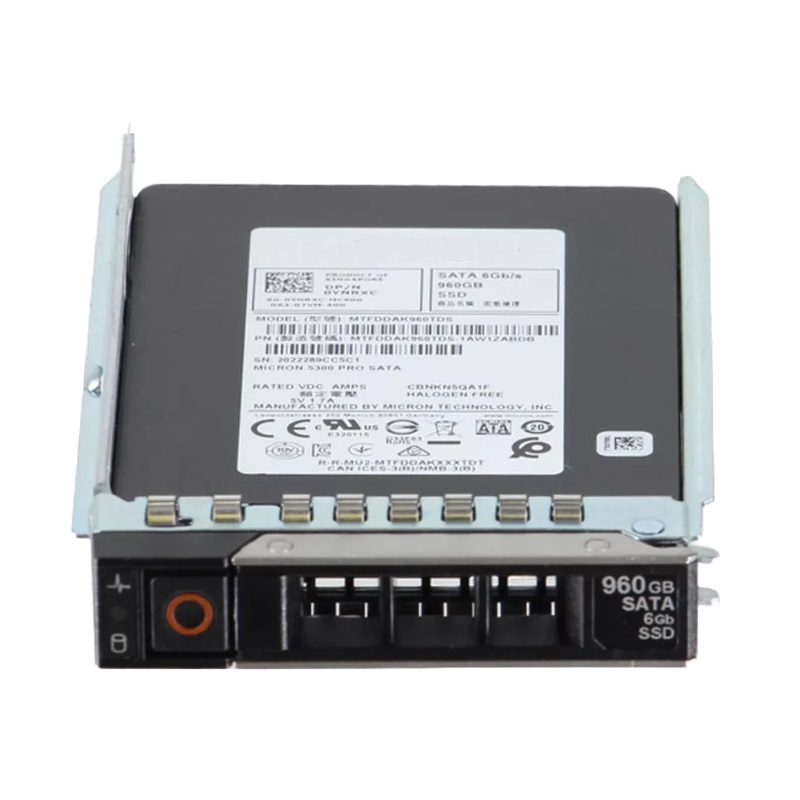
Dell D3HHM 960GB SATA 6GBPS Read Intensive 1dwpd TLC 2.5inch Hot Plug Solid State Drive. New Sealed in Box (NIB) with 1 Year Warranty
The Dell D3HHM 960GB Read-Intensive 1DWPD TLC SATA 6Gbps 2.5-Inch Hot-Plug Dell Certified SSD with tray is a high-performance storage solution designed for Dell 14G, 15G, and 16G PowerEdge servers. Built with 3D NAND TLC technology, it delivers fast performance, strong reliability, and efficient power consumption for enterprise-level workloads.
The Dell D3HHM SSD offers outstanding reliability, superior data throughput, and optimized endurance, making it an ideal choice for businesses requiring consistent speed and scalability. Its compatibility across multiple generations of PowerEdge servers ensures flexibility and smooth integration in various IT infrastructures.
The Dell D3HHM 960GB Read Intensive 1DWPD TLC SATA 6GBPS 2.5-inch Hot Plug Solid State Drive is engineered to deliver a dependable, cost-effective storage tier for enterprise-class PowerEdge servers, including 14th, 15th, and 16th generation platforms. As a Dell Certified SSD with a 960GB capacity, the D3HHM model targets read-heavy application workloads such as web serving, content distribution, virtualization read caches, and large-scale database read replicas. Built using triple-level cell (TLC) NAND flash and featuring a rated endurance of 1 drive write per day (1 DWPD), this drive balances capacity, performance, and long-term durability in mixed data center environments. The SATA 6Gb/s interface and 2.5-inch form factor support hot-plug insertion and removal with a standard Dell tray, simplifying replacement and upgrades while preserving high availability in rack and blade server deployments.
The 960GB capacity provides a high-density option for capacity-oriented tiers without resorting to 3.5-inch drives, enabling denser storage configurations within 2.5-inch bays. The 2.5-inch hot-plug form factor is a standard for contemporary Dell PowerEdge servers, making the D3HHM compatible with existing trays and drive backplanes used across 14g, 15g, and 16g server families. The SATA 6Gb/s interface offers broad compatibility with server controllers and integrated motherboard SATA ports, making this SSD suitable for both direct-attached storage (DAS) and hybrid array scenarios where SATA interfaces remain a cost-effective choice.
Rated at 1 DWPD, the drive is optimized for read-dominant workloads and applications where write amplification is limited. For many enterprise applications—such as cold and warm data access layers, content delivery nodes, analytics query caches, and boot/system volumes—this endurance rating is sufficient while offering a lower cost per GB compared to high-endurance SSDs. Understanding DWPD in context is essential: 1 DWPD means the full drive capacity can be written once per day over the warranty period without exceeding intended endurance characteristics. For use cases that require more intensive write cycles, consider higher DWPD models; conversely, for archival or infrequently written tiers, the D3HHM provides a comfortable balance of price and lifespan.
Triple-level cell (TLC) NAND stores three bits per cell, enabling higher capacities per die and thus larger drive capacities at a lower cost. While TLC has different endurance and performance characteristics compared to MLC or SLC, modern controllers, firmware optimizations, and over-provisioning strategies mitigate these limitations for read-heavy usages. The D3HHM’s TLC configuration pairs a cost-effective per-GB economics with firmware-level wear-leveling and error correction to maintain consistent performance across the drive’s service life.
While theoretical maximums for SATA 6Gb/s are well-known, real-world throughput depends on controller configuration, RAID levels, command queueing, and the mix of sequential and random operations. The D3HHM is tuned for read-dominant patterns where sequential read bandwidth and small-block random read IOPS are often the most relevant metrics. In practical deployments with balanced server architectures, administrators can expect faster application responsiveness for read-heavy workloads, reduced queue latency under concurrent reads, and consistent throughput under sustained access patterns compared to traditional spinning media.
SSDs dramatically reduce latency compared to HDDs, especially for random access. The D3HHM’s firmware emphasizes consistent read latency, which benefits transactional systems and virtualization hosts where multi-tenant VM performance sensitivity is high. Under mixed workloads with occasional writes, the drive leverages internal caching, over-provisioning, and background garbage collection to smooth latency spikes. However, heavy sustained writes will approach the drive’s DWPD limits and could influence latency characteristics, so it is best to evaluate workload write intensity before mass deployment.
Virtualized environments and database read-replica nodes often require high random read IOPS to sustain multiple VMs or parallel query operations. The D3HHM is positioned to deliver significantly higher IOPS for random reads than HDDs, enabling denser virtual machine consolidation and more responsive database indexing. When architecting virtualization clusters, pairing these SSDs with adequate RAM, CPU, and robust RAID caching policies will help exploit their IOPS advantage and reduce storage bottlenecks.
Certification for Dell PowerEdge 14th, 15th, and 16th generation servers ensures the D3HHM plugs into validated drive carriers, is recognized by server management firmware (iDRAC, OMSA), and interoperates with Dell RAID controllers and backplanes. This certification simplifies procurement and reduces integration risk since firmware-level compatibility tests verify proper handling of hot-swap events, drive health reporting, and SMART telemetry. Enterprises scaling across multiple PowerEdge generations will find this certified compatibility helpful for phased upgrades and mixed-generation clusters.
The included Dell tray allows tool-less insertion and secure mounting in drive bays designed for hot-swap operation. The hot-plug capability is critical for maintaining uptime: administrators can replace failed drives without powering down servers, preserving availability for critical services. Ensure trays are correctly seated and that the server platform firmware recognizes the drive status when performing replacements; following Dell’s drive insertion guidelines reduces human error and improves serviceability.
Although the D3HHM is a SATA-based SSD, the drive is commonly used behind hardware RAID controllers and in software RAID configurations. Many RAID controllers offer write-back cache and battery/flash-backed write cache options that can further improve write performance and protect in-flight data. Be mindful of RAID stripe sizes, rebuild times, and the RAID level chosen: RAID 10 provides improved rebuild characteristics for SSDs, while RAID 5/6’s rebuild overhead may vary with capacity and the number of spindles or SSDs in the array. For read-intensive workloads, RAID read performance is often the primary factor; choose controller and RAID settings that optimize sequential and random read patterns accordingly.
Enterprise SSDs like the D3HHM employ advanced wear-leveling algorithms and strong error correction codes (ECC) to prolong life and maintain data integrity. Wear-leveling distributes writes evenly across the NAND flash to prevent premature failure of specific blocks, while ECC corrects transient bit errors. These mechanisms, combined with over-provisioning, reduce the probability of uncorrectable errors and help the drive present stable SMART attributes to management systems.
While some higher-end enterprise SSDs include capacitive power loss protection to flush volatile caches to NAND during unexpected power events, SATA-class drives vary in how they implement data protection. The D3HHM’s firmware and onboard mechanisms work to minimize data loss risk, but architects should pair drives with redundant controllers, RAID configurations, and robust backup strategies to meet stringent data durability requirements. For workloads with critical in-flight write constraints, review the device’s datasheet and consider drives with explicit power-loss protection if needed.
Integrated health metrics and SMART attributes are accessible via Dell management tools and standard utilities, allowing administrators to monitor wear levels, reallocated sectors, uncorrectable errors, and read/write counts. Proactive alerts and analysis enable predictive replacement before failure impacts operations. Incorporating these metrics into monitoring dashboards and service automation reduces surprise failures and helps plan maintenance windows around low-impact periods.
Security-conscious deployments should verify whether the D3HHM supports hardware-based encryption (SED — Self-Encrypting Drive) and whether it conforms to standards such as OPAL. If hardware encryption is present, it simplifies compliance with data protection regulations by encrypting data at rest with minimal performance overhead. For environments that mandate encrypted storage, confirm controller and management support for key management and secure erase operations to ensure data sanitization aligns with policy.
End-of-life disposal requires careful data sanitation to prevent data remnants. Secure erase commands, firmware-based crypto-erase (if encryption is enabled), and validated overwrite procedures should be part of the data center’s decommissioning process. Use vendor tools or industry-accepted utilities that recognize SSD block mapping to reliably sanitize the D3HHM’s NAND without jeopardizing future reuse where policy allows.
Firmware management is crucial for stability and performance. Dell-certified SSDs like the D3HHM receive firmware updates that address compatibility, performance enhancements, and reliability fixes. Administrators should maintain a firmware baseline consistent with their server management strategy, test updates in lab environments prior to broad rollouts, and schedule updates during maintenance windows to mitigate unexpected interactions with RAID controllers or operating systems.
Understanding warranty terms, replacement policies, and available support options is a required part of lifecycle planning. Dell-certified drives typically come with manufacturer warranties and service-level options that align with enterprise support contracts. Track drive deployment dates, SMART wear indicators, and write counts to plan phased replacements before drives reach critical wear thresholds, minimizing disruption to production workloads.
Solid state drives, while less sensitive to mechanical shock than HDDs, still require adequate airflow and thermal design to sustain peak performance and longevity. The D3HHM’s specifications outline operating and non-operating temperature ranges; maintaining chassis airflow, avoiding blocked vents, and monitoring drive temperatures through management software prevents thermal throttling and extends service life. In dense server configurations, consider front-to-back airflow patterns and supplemental cooling for high-density SSD arrays.
Compared to spinning disks, SSDs generally consume less power for equivalent throughput, which can reduce data center energy costs and cooling requirements. Power consumption varies between active, idle, and sleep states; plan power budgets accordingly when replacing multiple HDDs with SSDs in a single chassis. Lower power draw under read-heavy operations contributes to a more efficient storage tier and supports greener infrastructure objectives.
Before performing drive swaps or upgrades, validate server firmware versions and RAID controller compatibility. Follow Dell’s mechanical and electrostatic discharge (ESD) guidelines when handling the drive and tray, and ensure the server is set to accept hot-plug events. For systems running critical workloads, coordinate with application owners and schedule change windows to verify that the operating system and RAID layer recognize new drives correctly during insertion and initialization.
When replacing a drive, mark the failed drive within the management console, ensure redundancy (e.g., sufficient mirrors or parity), and use the platform’s hot-swap indicators to avoid unintentional removals. Insert the drive into the tray and seat it firmly in the bay until mechanical latches engage. Monitor management logs to confirm the drive is discovered and, if part of a RAID set, that rebuilds start as intended. Always have spare trays and validated replacements on hand to minimize time to resolution.
Optimal use cases for the D3HHM include HTTP/edge caching, content delivery nodes, and media streaming edge servers, where read throughput and low-latency random access dominate performance needs. These scenarios benefit from the SSD’s ability to accelerate file serving and reduce seek-limited overhead associated with HDDs. When paired with network and application-level caches, the SSD tier becomes a performance multiplier for user-facing services.
Using devices like the D3HHM for hypervisor boot volumes and VM template storage reduces VM power-up times and improves responsiveness for multiple small-IO virtual machines. For read-centric VM workloads and non-persistent desktop pools, the drive offers a good tradeoff between capacity and performance. Consider placing highly writable VM swap files or write-heavy logs on a separate, higher-endurance tier to match workload profiles.
Database read-replicas that serve reporting and analytics workloads often require high random-read throughput but relatively low sustained writes. Deploying the D3HHM in read replica nodes can reduce query latency and improve concurrency for reporting systems, data marts, and OLAP-style access patterns. For primary transactional nodes with heavy writes, evaluate higher DWPD SSDs or NVMe alternatives for write-sensitive partitions.
Compared to enterprise HDDs, the D3HHM provides orders-of-magnitude lower random read latency and significantly higher IOPS for small-block workloads. It also offers lower mechanical failure risk and reduced energy usage. HDDs may still be more economical for sequential, archival, or extremely large-capacity cold storage, but for performance-sensitive tiers the SSD’s responsiveness and compact 2.5-inch footprint make it a compelling choice.
NVMe SSDs deliver much higher throughput and lower latency than SATA SSDs by using PCIe lanes and a modern command set. However, NVMe can be costlier and may require different backplane or server adapter configurations. The D3HHM sits as a cost-effective SATA option that fits existing SATA backplanes and RAID controllers, making it an attractive choice where NVMe adoption is not feasible or where SATA’s economics are preferred. For write-intensive, latency-sensitive databases, NVMe or higher-DWPD SSDs remain the superior technical choice if budget and platform support permit.


 Contact Us
 Information
 Catalog
 Solid State Drives (SSD)
 Network Switches
 Hard Disk Drives
 HBA & Controllers
 PC & Servers
 PC & Server Memory
 CPU & Processors
 Network Routers
 Power Supplies
 Tape Drives & Libraries
 Network Devices
 Computer & Network Cables