
(7% discount is applied at checkout)
Cart is empty
Your go-to destination for cutting-edge server products
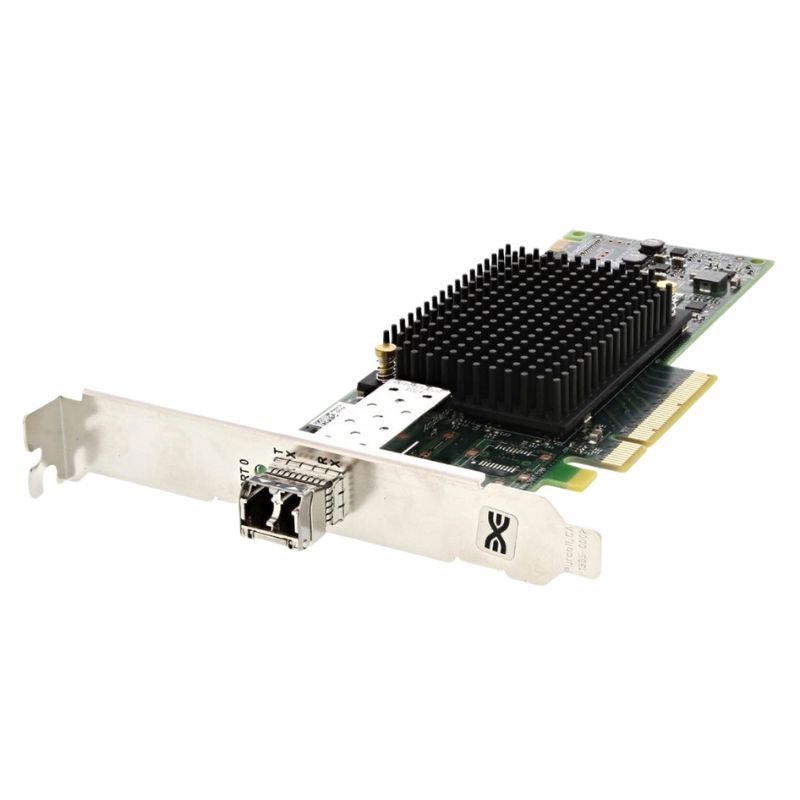
Dell LPE31000-M6-D Emulex Lpe31000 16GB Single Port FC Host Bus Adapter. New (System) Pull with 1 year replacement warranty
The Dell LPE31000-M6-D is a high-performance Host Bus Adapter (HBA) designed for enterprise environments requiring robust Fibre Channel connectivity. Engineered by Dell and identified by SKU# LPE31000-M6-D, this adapter delivers reliable, ultra-fast data transfer rates to support critical storage networks.
This adapter features a low-profile design ideal for space-constrained server chassis while delivering high throughput. The device operates reliably in varying environmental conditions, tolerating a broad humidity range from 5% to 95% non-condensing and storage temperatures between -20°C to 85°C (-4°F to 185°F).
The Dell LPE31000-M6-D supports diverse multimode fiber (MMF) cable standards to accommodate various data center environments:
Compatible with a broad spectrum of operating systems, this adapter ensures enterprise flexibility and integration ease. Supported platforms include:
The Dell LPE31000-M6-D adheres to an extensive range of current and legacy industry standards, ensuring compatibility and future-proofing in SAN environments:
Designed to meet the demands of high-speed storage area networks (SANs), this adapter is ideal for:
The Dell LPE31000-M6-D Emulex LPe31000 16GB Single Port Fibre Channel Host Bus Adapter (HBA) is designed for enterprise-class storage networks where high throughput, low latency and dependable connectivity are essential. This category of single-port 16Gb Fibre Channel HBAs targets data centers, virtualization platforms, and storage area network (SAN) environments that require predictable performance and robust interoperability with mainstream server and storage vendors.
The defining feature of this HBA is its native support for 16 gigabit Fibre Channel, offering a balance of bandwidth and latency suited for modern SAN workloads. Single port configurations are ideal where point-to-point or zoned fabric connections are used and where simple, reliable links to storage arrays are needed.
Built for 24/7 data center operation, Emulex-series HBAs emphasize error handling, robust firmware, and proven interoperability. These attributes reduce unplanned downtime and ensure sustained I/O consistency for transactional databases, virtual machines, and backup/restore operations.
The LPE31000 family is widely supported across leading server vendors and storage arrays. Native support in common operating systems and storage stacks helps shorten deployment cycles and reduces driver-related issues. Compatibility is a core selling point for enterprise procurement teams that require predictable behavior in mixed-vendor environments.
Single-port HBAs use less PCB space and draw less power than multi-port counterparts, making them a sensible choice for high-density server deployments where heat, rack space and total power budget matter.
Correct driver and firmware versions are crucial for stability and performance. Dell typically certifies specific driver/firmware combinations for server models; follow Dell's compatibility matrix when integrating into a production environment. Emulex management utilities and vendor-provided CLI/GUI tools provide firmware flash capabilities, diagnostic info, and configuration options that facilitate lifecycle management.
This HBA provides a standard host interface to the server (PCIe connector) and a Fibre Channel optical or SFP+ port for SAN connectivity (single SFP slot). When selecting transceivers and cables, check the supported SFP types and fiber distances; choosing mismatched optics can result in link flaps or reduced performance.
While the HBA provides 16Gb raw link speed, actual throughput depends on SAN path contention, storage array performance, host I/O queue depth and application patterns. Tune driver-level queue depths, host OS block settings, and multipathing parameters to align with workload characteristics (sequential vs random, large block vs small transaction).
Regular monitoring of link status, error counters, and throughput helps detect degradation before it impacts applications. Use SAN switch monitoring, array counters and host-based telemetry tools to collect baseline performance and to track anomalies over time.
This HBA is commonly deployed in Dell PowerEdge and similar enterprise servers. Supported operating systems usually include major enterprise Linux distributions (RHEL, CentOS, SUSE), Microsoft Windows Server, VMware ESXi, and others. Always reference the Dell support pages for exact driver compatibility for your specific OS version and kernel level.
The adapter is vendor-neutral at the Fibre Channel level, meaning it can interoperate with many storage arrays from leading vendors and SAN switches. Nonetheless, for critical deployments, verify the HBA SKU against the storage vendor's compatibility list (HCL) to avoid surprises.
Firmware updates often contain critical bug fixes, performance improvements, and security hardening. In high-availability environments, staying current with tested firmware revisions avoids known issues and improves compatibility with modern switch and array firmwares.
Symptoms: link up/down events, SAN path failover, or device disappearance. Common causes include incompatible optics, damaged fiber, unclean connectors, or incorrect SFP type. Steps:
Symptoms: OS boot hangs, driver crashes, or unpredictable I/O errors. Steps:
If throughput or latency degrades, consider:
Like any firmware-equipped device, HBAs can have vulnerabilities. Keep firmware current, subscribe to vendor security advisories, and apply mitigations as required by your organization's security policy.
SAN zoning and LUN masking are primary logical controls for access to storage. Implement strict zoning policies and limit WWPN registration to known hosts. Use SAN switch features to isolate sensitive data paths and audit access where supported.
16Gb single-port HBAs are a good fit for hypervisor nodes where a single aggregated storage path is sufficient or where virtual machines are balanced across redundant hosts. Pair with vSphere/Hyper-V multipathing tools to improve resilience and performance.
Databases that require low latency benefit from the predictability of Fibre Channel fabrics. Properly tuned HBA drivers and stable SAN back-end resources help reduce tail latency for OLTP workloads.
Single-port HBAs can be dedicated to backup traffic in some architectures or shared when bandwidth requirements are moderate. For replication tasks, ensure link utilization and array performance meet RPO/RTO goals.


 Contact Us
 Information
 Catalog
 Solid State Drives (SSD)
 Network Switches
 Hard Disk Drives
 HBA & Controllers
 PC & Servers
 PC & Server Memory
 CPU & Processors
 Network Routers
 Power Supplies
 Tape Drives & Libraries
 Network Devices
 Computer & Network Cables