
(7% discount is applied at checkout)
Cart is empty
Your go-to destination for cutting-edge server products
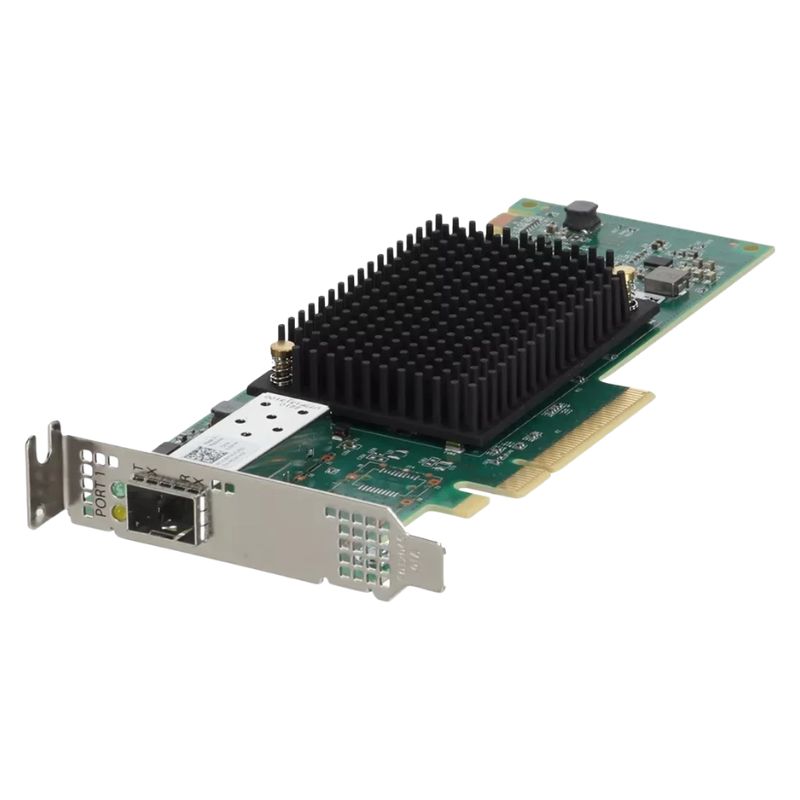
Dell NNW66 Lpe35000-m2 Emulex Single-port Pcie 4.0 32g/64g Fibre Channel Host Bus Adapter. New (System) Pull with 1 year replacement warranty
The Dell NNW66 is engineered as a compact, low-profile PCIe card designed for versatile server integration. Its dimensions measure approximately 167.64 mm in length and 68.91 mm in width (6.60” x 2.71”), making it suitable for dense rack environments and space-conscious deployments.
This adapter represents the 7th generation Fibre Channel technology, supporting dual-speed operation at both 32 Gb/s and 64 Gb/s, ensuring high throughput and reliable connectivity for demanding data centers.
This host bus adapter supports multiple optical data rates with automatic detection, including:
Equipped with a single port using shortwave laser optics and LC-type connectors, the NNW66 utilizes a PCIe Gen4 x8 interface, providing robust I/O throughput. It integrates the Xe601 controller, supporting a broad range of hardware platforms such as Intel x64, Intel x86, and PowerPC architectures.
The Dell NNW66 HBA ensures wide compatibility with enterprise-grade OS platforms, including but not limited to:
The Dell NNW66 LPE35000-M2 Emulex is a high-performance, single-port Fibre Channel Host Bus Adapter (HBA) engineered for modern data center workloads. Built on the PCIe 4.0 interface, this adapter supports both 32 Gbps and 64 Gbps Fibre Channel speeds depending on firmware and optics, delivering predictable low-latency connectivity to SAN storage arrays and enterprise-class storage networks. The LPE35000-M2 family emphasizes throughput, CPU offload, and enterprise-grade reliability — attributes vital for virtualization, database systems, backup appliances, and high-transaction applications.
Selecting the NNW66 LPE35000-M2 provides a blend of modern interface speed and SAN-centric features necessary for demanding environments. The adapter is designed to minimize CPU cycles spent on storage traffic through deep hardware offload, freeing host resources for application workloads. Its compatibility with industry-standard Fibre Channel fabrics makes it an ideal choice for organizations migrating to higher link speeds while retaining existing SAN infrastructures.
The transition to PCIe 4.0 and 64 Gbps link rates brings measurable performance improvements:
At 64 Gbps line rate, a properly configured adapter can support significantly more IOPS and sustained throughput compared with legacy 16G/32G HBAs. Actual results depend on storage backend performance, zoning, fabric congestion, and protocol overhead. When sizing environments, account for headroom to avoid saturating the single port during peak windows; many deployments pair multiple HBAs or use multipathing solutions for redundancy and aggregated throughput.
A critical advantage of the Dell Emulex LPE35000-M2 is broad interoperability across SAN ecosystems. Emulex firmware and driver stacks are mature and widely certified with major storage vendors, hypervisors, and switch manufacturers. Compatibility considerations include firmware revision, supported optics (SFP28, SFP56, or vendor-specific transceivers), and host driver matchmaking with the server OS and hypervisor.
The adapter is commonly validated with enterprise arrays (Dell PowerStore, PowerMax, NetApp AFF, Pure Storage) and Fibre Channel switches (Brocade/Fibre Channel, Cisco MDS, Dell Networking). For maximum reliability, consult storage and switch interoperability matrices and ensure SAN fabric components run recommended firmware levels. Where vendor compatibility is critical (e.g., vendor-limited support contracts), verify the exact LPE35000-M2 part number and firmware level with the storage vendor before large-scale rollouts.
The LPE35000-M2 typically fits common server form-factors with low-profile and full-height bracket options to accommodate rack servers, tower systems, and blade chassis that expose PCIe slots. Installation is a standard PCIe plug-and-play operation, but careful planning ensures optimal performance and thermal behavior.
PCIe 4.0 devices can generate more heat under sustained traffic. Place the adapter in a slot with adequate airflow and avoid crowding the area with other high-thermal components. Follow server vendor recommendations for slot population order if multiple adapters are installed. If using a blade chassis, consult the chassis guide for supported mezzanine combinations and thermal derating.
Firmware and driver harmony is essential for HBA stability and performance. Emulex firmware versions typically include improvements for link negotiation, error recovery, and offload behavior. Dell often curates tested driver/firmware bundles for its PowerEdge family — using these validated combos reduces the risk of compatibility issues.
Emulex provides CLI tools and diagnostics for link statistics, heartbeat counters, error frames, and fabric health. Use these utilities to assess CRC errors, link drops, or throughput anomalies. In virtualized hosts, pair adapter-level diagnostics with hypervisor logging to correlate guest-level performance with physical HBA metrics.
Single-port adapters present a potential single point of failure — for mission-critical systems, plan for HBA redundancy and multipath I/O (MPIO). Typical high-availability architectures use either dual HBAs per host connected to separate fabric switches or port-channeling and switch-level redundancy.
A resilient design frequently employs two LPE35000-M2 adapters in separate slots, each cabled to an independent fabric switch, providing both path redundancy and load distribution. For virtualized clusters, combining multipathing with clustering-aware storage policies reduces outage windows during maintenance or failures.
The Dell NNW66 LPE35000-M2 suits a wide range of enterprise workloads where SAN performance, reliability, and fabric compatibility are required. Below are common deployment scenarios:
In VMware and Hyper-V environments, the adapter supports large VM densities and high I/O guest profiles. Offload capabilities help preserve host CPU cycles while sustaining heavy I/O from many VMs concurrently. Pair with DRS/HA and storage multipathing for robust operations.
Low latency and consistent I/O are crucial for database workloads (Oracle, SQL Server, PostgreSQL). Faster Fibre Channel links help reduce read/write latency and improve transaction throughput, translating directly to better application responsiveness.
High-throughput backup windows benefit from the adapter’s ability to drive sustained large-block transfers. When used with deduplication appliances or tape libraries over FC, administrators can shorten backup windows and meet tight RPO/RTO targets.
Although HPC often uses InfiniBand or Ethernet-based fabrics, certain storage-centric HPC workflows with SAN-backed file systems can leverage high-speed FC adapters for accelerated checkpoints and data staging operations.
When selecting the LPE35000-M2, evaluate against alternate HBAs by weighing raw link speed, offload capability, firmware maturity, and warranty support. Consider whether a single-port 64G adapter meets throughput requirements or if dual-port 32G/64G designs are preferable based on redundancy and path aggregation needs.
Upgrading from older HBAs involves not only adapter cost but potential server firmware updates, driver validation, optics replacement, and SAN tuning. Quantify the performance gains in terms of reduced job windows, improved service levels, and consolidation benefits to justify procurement decisions.
Even mature hardware can present integration challenges. Awareness of frequent pitfalls helps ensure a smoother deployment:
Installing incompatible driver/firmware pairs can cause link flapping, incorrect speed negotiation, or data path errors. Always apply validated combinations from Dell’s support resources or Emulex advisories.
Using off-brand optics may reduce link stability or void support with some vendors. Select transceivers listed as supported in both the adapter and switch documentation.
Relying on a single HBA and single fabric exposes the host to outages. Design redundancy into the SAN topology using dual HBAs and fabrics where high availability is required.
When encountering connectivity or performance problems, follow a methodical approach:
Security of storage traffic and firmware integrity are top priorities. Keep management planes separated from data planes, restrict access to adapter management utilities, and follow change-control processes for firmware updates. Where regulatory compliance applies, maintain audit trails of configuration changes and HBA firmware histories.
Completing an HBA deployment may require optics, breakout cables, switch ports, and possibly SFP adapters. Consider lifecycle planning for spares, firmware refresh schedules, and eventual migration paths to multi-port or converged network adapters should future workloads demand it.
Monitor vendor announcements and hardware lifecycle notices. When planning upgrades, align HBA replacement with server refresh cycles and SAN modernization to reduce disruption. Consider backward compatibility and the possibility to repurpose existing optics when migrating between speed generations.
A: Yes — the adapter negotiates link speed with the switch and will function at lower supported rates where required. However, some advanced features or performance benefits require both the HBA and the fabric to support higher line rates and associated firmware features.
A: While third-party optics sometimes work, it is best practice to use vendor-approved transceivers validated by Dell and the switch manufacturer. Using unapproved optics may lead to link instability and can influence support entitlements.
A: For non-critical workloads or where the host can tolerate temporary loss of storage connectivity, a single-port HBA may suffice. For production systems requiring high availability, use dual HBAs and multipathing across separate fabrics.
A: Monitor link status, CRC/frame errors, buffer credits, throughput, and latency counters. Integrate these metrics into existing monitoring solutions to detect early signs of degradation.
The Dell NNW66 LPE35000-M2 Emulex single-port PCIe 4.0 32G/64G Fibre Channel HBA represents a modern SAN connectivity option for organizations balancing the need for high throughput, low latency, and enterprise-grade interoperability. Proper planning — including driver and firmware validation, redundancy design, and optics selection — ensures that the adapter delivers reliable service for virtualization, databases, backups, and other storage-intensive workloads. Incorporate the best practices and checklists above to maximize performance and reduce deployment risk within your existing SAN ecosystem.


 Contact Us
 Information
 Catalog
 Solid State Drives (SSD)
 Network Switches
 Hard Disk Drives
 HBA & Controllers
 PC & Servers
 PC & Server Memory
 CPU & Processors
 Network Routers
 Power Supplies
 Tape Drives & Libraries
 Network Devices
 Computer & Network Cables