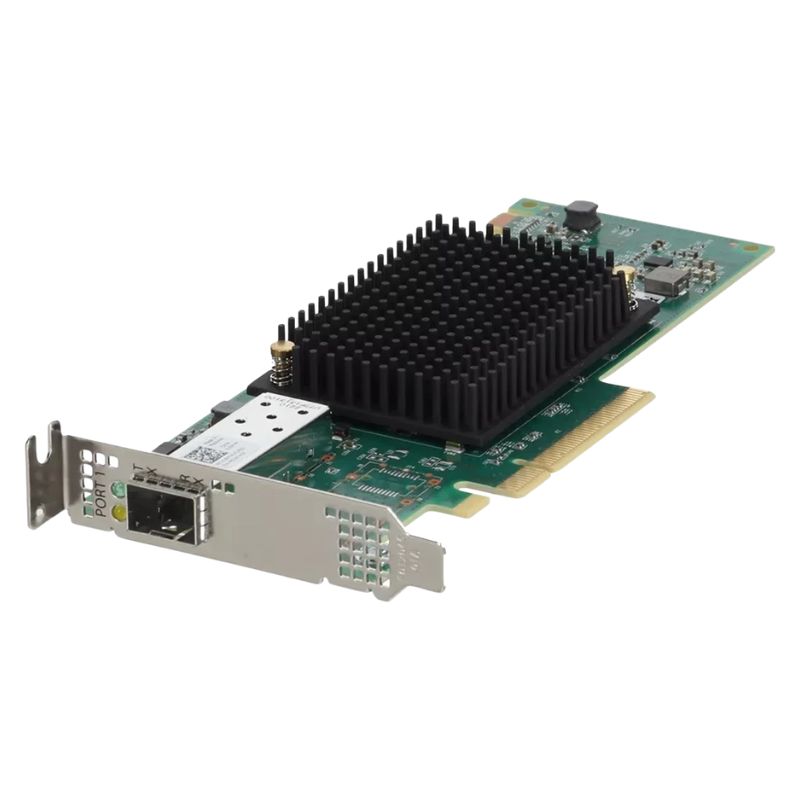
YXT7V Dell Lpe35000-m2 Emulex Single-port PCI-E 4.0 32g/64g FC HBA.
- — Free Ground Shipping
- — Min. 6-month Replacement Warranty
- — Genuine/Authentic Products
- — Easy Return and Exchange
- — Different Payment Methods
- — Best Price
- — We Guarantee Price Matching
- — Tax-Exempt Facilities
- — 24/7 Live Chat, Phone Support
- — Visa, MasterCard, Discover, and Amex
- — JCB, Diners Club, UnionPay
- — PayPal, ACH/Bank Transfer (11% Off)
- — Apple Pay, Amazon Pay, Google Pay
- — Buy Now, Pay Later - Affirm, Afterpay
- — GOV/EDU/Institutions PO's Accepted
- — Invoices
- — Deliver Anywhere
- — Express Delivery in the USA and Worldwide
- — Ship to -APO -FPO
- — For USA - Free Ground Shipping
- — Worldwide - from $30
Product Snapshot — Dell YXT7V (LPe35000-M2)
The Dell YXT7V (LPe35000-M2) is a Gen-7 Emulex Fibre Channel Host Bus Adapter (HBA) designed for high-performance SAN environments. It provides a single LC-optical port, supports 32G and 64G Fibre Channel data rates (auto-negotiating to lower speeds for backward compatibility), and plugs into a PCIe Gen4 x8 host slot. :contentReference[oaicite:0]{index=0}
Enterprise performance and low latency
Engineered for demanding flash arrays and NVMe-optimized stacks, the LPe35000 family brings Gen-7 improvements in latency and IOPS, letting you squeeze more throughput from modern storage systems. Its multi-core XE601 I/O controller dynamically applies resources per port to maintain consistent performance under heavy I/O loads. :contentReference[oaicite:1]{index=1}
Compact, server-friendly form factor
- Short, low-profile PCIe card — ideal for rack servers and dense enclosures.
- Single LC connector port for easy fibre cabling and compatibility with common transceivers.
- Fits PCIe Gen4 x8 slots and is backward compatible with Gen3 hosts where needed. :contentReference[oaicite:2]{index=2}
Key technical specs (at a glance)
- Part number / SKU: YXT7V (Dell); LPe35000-M2 (Emulex/Broadcom). :contentReference[oaicite:3]{index=3}
- Porting: 1 optical port (LC).
- Host interface: PCIe Gen4 x8 (backwards compatible with Gen3). :contentReference[oaicite:4]{index=4}
- Controller: XE601 I/O Controller (Emulex). :contentReference[oaicite:5]{index=5}
- Optical data rates: 64GFC / 32GFC (auto-detected), with lower speed support (16G, 8G). Representative line rates include ~28.05 Gb/s, ~14.025 Gb/s and ~8.5 Gb/s (protocol raw rates noted by vendors). :contentReference[oaicite:6]{index=6}
- Operating range: 0°C to 55°C; storage down to −20°C (specs vary slightly by vendor). :contentReference[oaicite:7]{index=7}
- Dimensions: Short, low-profile PCIe card (approx. 167.64 mm × 68.91 mm). :contentReference[oaicite:8]{index=8}
Media & cabling compatibility
Multimode and single-mode distances
The adapter supports multimode (OM3/OM4/OM5) and single-mode optics. Typical vendor tables list:
- OM4/OM5 multimode: up to ~100 m at 64G/32G (vendor-dependent).
- OM3 multimode: up to ~70 m at 64G/32G.
- Single-mode (9/125 µm): up to 10 km at 32G/16G when approved long-wave transceivers are used.
These reach figures depend on the transceiver type and the cable grade; always verify the exact transceiver model and multimode classification before deployment. :contentReference[oaicite:9]{index=9}
Compatibility & software support
Operating systems and vendor drivers
Broadcom/Emulex and Dell provide driver stacks and management utilities for a broad array of enterprise OSes. Supported platforms commonly include:
- Microsoft Windows (server editions).
- VMware vSphere hypervisor.
- Red Hat Enterprise Linux (RHEL), SUSE Linux Enterprise Server (SLES), Oracle Linux (including UEK), Oracle Solaris.
- Additional OEM/partner support channels are listed by Dell and Broadcom for certified driver downloads and firmware. :contentReference[oaicite:10]{index=10}
Performance features and enterprise advantages
Scalability
- Support for up to 64GFC enables scaling SAN throughput as array performance grows.
- Backward compatibility with 16G/8G environments eases phased migrations.
Reliability & manageability
- Enterprise drivers and diagnostics from Broadcom/Emulex and Dell ensure firmware/driver management and extensive telemetry.
- Designed for always-on datacenter use with broad vendor verification. :contentReference[oaicite:11]{index=11}
Use cases — where this HBA shines
High-performance SANs
If your infrastructure uses all-flash arrays, NVMe backends, or high-bandwidth storage clusters, the Gen-7 HBA helps ensure fabric bandwidth is not the bottleneck.
Virtualized & converged platforms
The adapter is well suited to VMware and Linux hypervisor deployments that require consistent storage latency and high IOPS per host. :contentReference[oaicite:12]{index=12}
Buying considerations & deployment tips
Mixing generations
- Mixing Gen-7 HBAs with older switches is possible but validate speed negotiation settings to avoid link mismatches.
- When migrating fabrics, plan cabling and transceiver purchases to match desired reach and power budgets.
Firmware and driver best practices
- Always install vendor-recommended firmware and drivers for your server model (Dell service pages and Broadcom support pages list certified downloads).
- Test firmware/driver upgrades in a staging environment before rolling them to production. :contentReference[oaicite:13]{index=13}
Quick reference — highlights for product pages and metadata
- Title suggestion: Dell YXT7V LPe35000-M2 — Emulex Single-Port PCIe 4.0 32G/64G Fibre Channel HBA
- Meta description suggestion: High-performance Dell YXT7V (LPe35000-M2) Emulex FC HBA — single LC port, PCIe Gen4 x8, XE601 controller, 32G/64G speeds, OM3/OM4/OM5 & single-mode support.
- Schema hint: Use Product schema with attributes for model (YXT7V), brand (Dell), sku, technicalSpec (portCount, interface, supportedSpeeds), and offers for price/availability.
Manufacturer & documentation
Official product briefs and datasheets from Broadcom/Emulex and vendor pages from Dell or authorised resellers provide detailed tables, firmware images, and validated OS driver lists — consult these documents for final deployment checks and certified transceiver options. :contentReference[oaicite:14]{index=14}
Final note
The Dell YXT7V / Emulex LPe35000-M2 is a compact, enterprise-grade single-port HBA geared toward modern, high-throughput storage infrastructures. For best results, pair it with certified transceivers and keep firmware and drivers current via Dell and Broadcom support sites. :contentReference[oaicite:15]{index=15}
Dell YXT7V LPe35000-M2 PCIe 4.0 32G/64G Fibre Channel HBA
The Dell YXT7V LPe35000-M2 represents a modern class of Fibre Channel Host Bus Adapters (HBAs) designed for data centers, enterprise servers, and storage area network (SAN) environments that demand high throughput, low latency, and rock-solid reliability. This category description explores the adapter’s role within storage infrastructures, technical highlights, deployment scenarios, compatibility considerations, and purchasing guidance for system architects, storage admins, and procurement teams.
What defines this adapter category?
HBAs in the Dell YXT7V / Emulex LPe35000 family are single-port PCIe 4.0 Fibre Channel host controllers that support multi-rate operation — commonly advertised as 32 Gbps and 64 Gbps Fibre Channel lanes (often via firmware configuration or auto-negotiation with switches and storage arrays). They are engineered to accelerate block storage traffic between servers and SANs, offloading storage protocol processing from the host CPU and providing deterministic I/O behavior for latency-sensitive workloads.
Core technical attributes
- Interface: PCI Express Gen4 (x8 or x16 electrical depending on model/implementation) for increased host bus bandwidth.
- Port type: Single full-featured Fibre Channel port (SFP+/QSFP variants may be used in specific SKUs or with adapters/cables), optimized for 32G and 64G operation.
- Protocol offload: Hardware offload for FC framing and related features, reducing CPU utilization and improving application performance.
- Advanced features: Virtualization support, NPIV (N_Port ID Virtualization), fabric plug-and-play, target and initiator modes, and enhanced diagnostic telemetry.
- Management: Driver and management utilities typically provided by Emulex/Dell for OS integration, firmware updates, and performance monitoring.
Single-port 32G/64G Fibre Channel HBA
Selecting a single-port 32G/64G HBA is often a deliberate balance between performance, slot density, cost, and the physical server or blade environment. Key reasons include:
- High-performance block I/O: Ideal for databases, virtual machine hosts, backup servers, and analytics nodes where predictable latency and high IOPS are required.
- Lower slot usage: Single-port cards conserve PCIe slots, enabling additional network or acceleration cards in the same host.
- Energy and heat efficiency: Modern Gen4 silicon tends to be more energy-efficient than older generations while providing more throughput.
- Simpler cabling and zoning: With fewer ports per host, fabric topologies and SAN zoning remain less complex in many deployments.
Performance characteristics and expectations
Performance for this HBA category hinges on several variables: the Fibre Channel link rate (32G or 64G), the PCIe host fabric bandwidth, host CPU and memory configuration, storage array performance, and SAN switching infrastructure. When implemented correctly, an Emulex LPe35000-class adapter provides:
- High sustained sequential throughput suitable for large block transfers (backup/restore, VM migration).
- Low, consistent latency for transactional workloads (databases, VDI, OLTP).
- Improved CPU utilization due to protocol offloads and intelligent buffering.
Throughput and latency considerations
While link speed (32G/64G) sets the nominal maximum bandwidth, real-world throughput depends on I/O patterns (random vs sequential), queue depth, and the storage target performance. System designers should:
- Match HBA link speed to SAN switch and storage port capabilities to avoid mismatch or auto-negotiation pitfalls.
- Ensure the server’s PCIe slot offers adequate lanes and Gen4 support; otherwise the HBA may be bottlenecked by the host bus.
- Tune multipathing, queue depths, and driver settings for the workload profile.
Compatibility and interoperability
Interoperability is paramount in SAN environments. The Dell YXT7V LPe35000-M2 class of HBAs is typically validated with major server OSes and popular SAN arrays and switches, but integrators should confirm exact support matrices for a given firmware revision or Dell part number.
Supported server platforms
These HBAs are commonly used in Dell PowerEdge servers and are also compatible with many other x86 servers that provide a standard PCIe slot and vendor-supported driver availability. Before purchase:
- Check Dell’s compatibility lists for the specific YXT7V part number and PowerEdge model.
- Verify BIOS/UEFI settings and available PCIe lane distribution for multi-card systems.
Supported operating systems & drivers
Emulex HBAs typically offer drivers and management packages for Windows Server, several Linux distributions (RHEL, CentOS, Ubuntu, SUSE), VMware ESXi, and other enterprise OSes. When planning deployments:
- Confirm driver compatibility with your OS version and the HBA firmware level.
- Use vendor-supplied management tools for firmware updates and advanced configuration (for example: path management, adapter firmware flashing, logging).
SAN switches, fabrics and arrays
The HBA must interoperate with the SAN fabric (Brocade/Extreme, Cisco MDS/Nexus with FC modules, HPE StorFabric, etc.) and storage arrays from vendors such as Dell EMC, NetApp, Pure Storage, or others. Best practices:
- Validate port speeds and zoning requirements on switches to prevent fibre link errors.
- Ensure storage array front-end ports support 32G/64G and are on compatible firmware.
- Test NPIV and FC features like fabric failover in a lab before production rollout.
Deployment scenarios and typical use cases
This HBA category serves a broad set of enterprise functions. Below are commonly encountered deployment patterns and recommended design considerations.
VMware and virtualized hosts
For virtualization platforms, single-port high-speed HBAs are frequently used on hosts that primarily service storage-heavy workloads or act as dedicated backup or database VM hosts. Consider:
- Leveraging multipathing software (VMware Native Multipathing, ALUA-aware drivers) for resiliency and performance aggregation.
- Using NPIV for per-VM zoning when required by storage management policies.
Databases and latency-sensitive applications
Low-latency block access is crucial for OLTP databases and analytics engines. In these deployments:
- Provision separate fabrics or dedicated ports for storage traffic to minimize contention.
- Closely monitor queue depths, read/write ratios, and implement storage-level QoS where supported.
Backup, replication and disaster recovery
High-throughput HBAs accelerate backup windows, replication traffic, and snapshot transfers. Typical guidance:
- Use high-speed links for backup hosts or appliances to shorten backup windows.
- Prefer larger sequential transfers when possible to maximize sustained throughput.
Firmware, drivers and lifecycle management
Keeping firmware and drivers up-to-date is vital for security, compatibility, and bug fixes. For HBAs, pay attention to vendor advisories that address data integrity, link stability, or performance improvements.
Updating firmware safely
Firmware updates should follow a controlled, tested process:
- Test updates in a lab before rolling into production to observe any regressions.
- Schedule maintenance windows — firmware flashing typically requires reboots and may temporarily interrupt storage access.
- Document firmware and driver versions for configuration management and future troubleshooting.
Monitoring and telemetry
Modern HBAs provide telemetry and diagnostics that help detect link resets, CRC errors, or fabric negotiation issues. Integrate HBA metrics into central monitoring and alerting platforms to quickly surface anomalies.
Security, compliance and data integrity
Although HBAs operate at the block layer and do not perform encryption by themselves, they are critical components of a secure storage infrastructure. Security considerations include:
- Restrict physical access to servers and SAN cabling to prevent tampering.
- Ensure firmware is obtained from trusted vendor sources and validated via checksums where provided.
- Combine HBAs with storage-level encryption (self-encrypting drives, array-based encryption) and network segmentation to protect data in flight and at rest.
Regulatory and audit considerations
For regulated environments (finance, healthcare, government), maintain an auditable trail of changes to HBA firmware, driver versions, and configuration adjustments. Track which hosts were updated, when, and by whom.