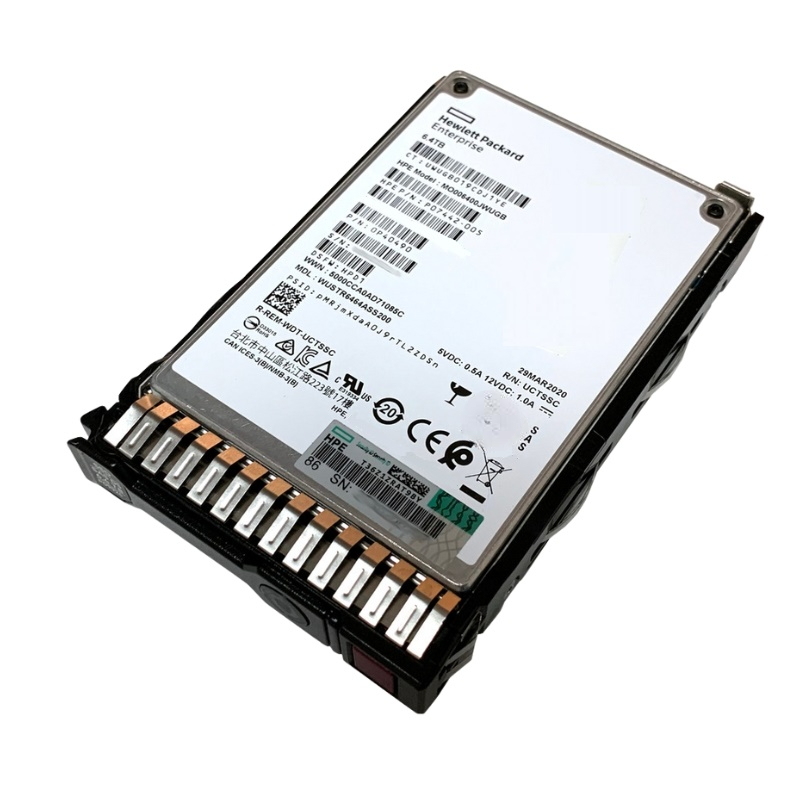
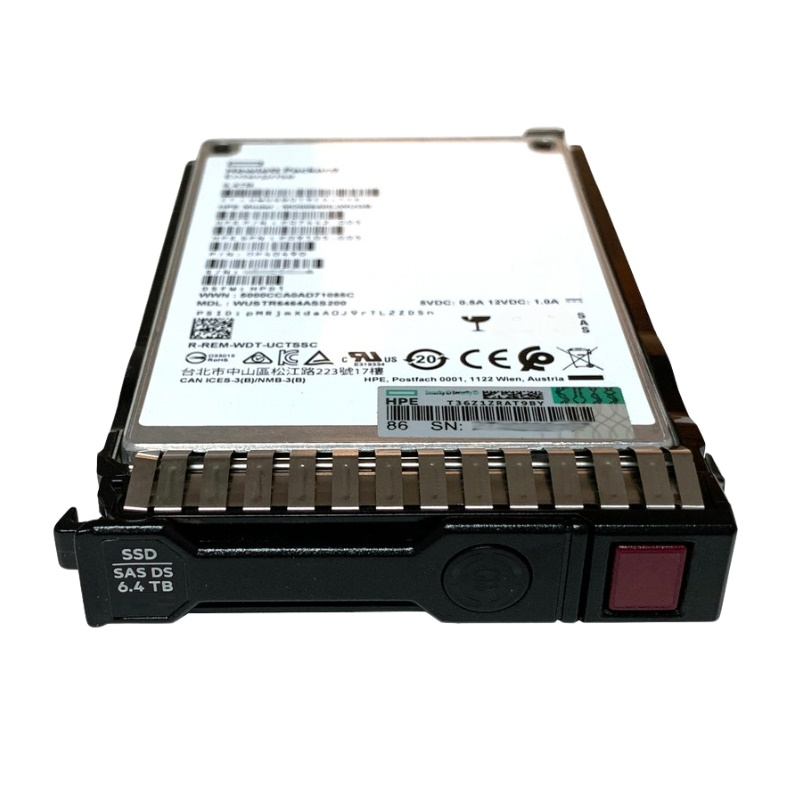
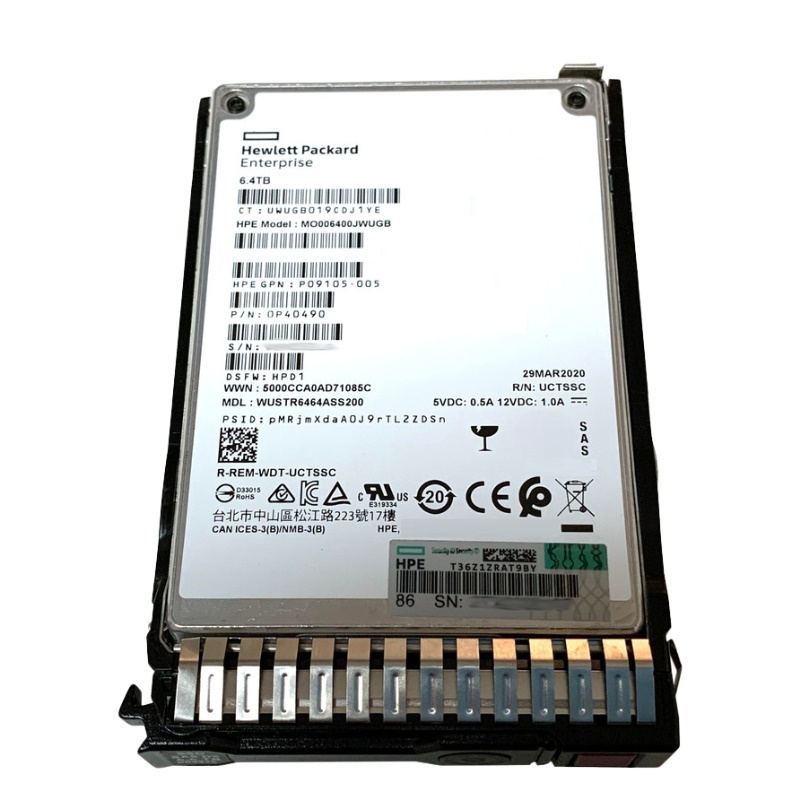
Overview HPE MO006400JWUGB 6.4TB SAS 12Gbps Mixed Use SSD
The HPE MO006400JWUGB 6.4TB SAS 12Gbps Mixed Use SFF (2.5-inch) MLC Solid State Drive delivers exceptional reliability, blazing-fast speed, and enterprise-level endurance. Designed for HPE Gen9 and Gen10 servers, this drive combines superior read/write performance with digitally signed firmware for enhanced security and data integrity across critical business workloads.
General Information HPE MO006400JWUGB 6.4TB SAS
- Manufacturer: HPE
- Model: MO006400JWUGB
- Product Type: Solid State Drive (SSD)
Technical Specifications
Storage and Interface
- Capacity: 6.4TB
- Interface: SAS 12Gbps for superior throughput and bandwidth.
- Form Factor: Standard SFF 2.5-inch drive ideal for dense data center deployments.
- Height: 15mm
Key Highlights and Product Features
- High Storage Capacity: 6.4 terabytes of optimized storage for mixed-use environments.
- Interface: High-speed SAS 12Gbps interface ensures rapid data transmission.
- Compact Form Factor: 2.5-inch SFF design fits easily into space-constrained server bays.
- Security Assured: Digitally signed firmware to safeguard data integrity and prevent unauthorized code execution.
- Reliability: Engineered for sustained performance under continuous enterprise workloads.
Performance Metrics
Designed for mixed-use workloads, the HPE 6.4TB MO006400JWUGB SSD offers consistent performance and durability for transactional databases, virtualization, and real-time analytics.
- Random Read IOPS: Up to 140,000
- Random Write IOPS: Up to 123,000
- Sequential Read Speed: 1,095 MB/s
- Sequential Write Speed: 1,045 MB/s
Physical Attributes
- Dimensions (H x W x D): 8.75 x 7.25 x 5.5 inches
- Weight: 1.1 lb
- Design: Compact and lightweight for easy installation and efficient cooling.
Performance and Reliability Advantages
Enterprise-Class Speed and Stability
Built with MLC NAND flash memory, this SSD ensures stable performance across high-demand workloads, including virtualization, high-performance computing, and business-critical databases. Its 12Gbps SAS interface delivers consistent throughput for fast data access and seamless scalability.
Mixed-Use Endurance
This model is ideal for environments that require a balanced ratio of read and write operations, offering enhanced durability and predictable performance over time.
Security and Firmware Integrity
The digitally signed firmware ensures that only trusted code runs on your device, mitigating security vulnerabilities and ensuring firmware authenticity for compliance-driven industries.
Use Case Scenarios
Optimized for Enterprise Workloads
- Database and analytics applications demanding rapid I/O.
- Virtualized infrastructure requiring low-latency data access.
- High-performance computing (HPC) and cloud environments.
- Mission-critical systems where uptime and data protection are paramount.
Data Center Integration
The HPE MO006400JWUGB SSD integrates seamlessly into HPE ProLiant Gen9 and Gen10 servers, ensuring compatibility and optimized firmware management through HPE Smart Carrier systems. This results in enhanced operational efficiency and streamlined data management in enterprise storage arrays.
Compatibility Information
HPE ProLiant BL Series: BL460c Gen10 (2.5 inch)
HPE ProLiant DL Series: DL325 Gen10 (2.5 inch), DL325 Gen10 Entry (2.5 inch), DL325 Gen10 Performance (2.5 inch), DL325 Gen10 SMB Solution (2.5 inch), DL360 Gen9 (2.5 inch), DL360 Gen9 Base (2.5 inch), DL360 Gen9 CMS (2.5 inch), DL360 Gen9 Entry (2.5 inch), DL360 Gen9 Performance (2.5 inch), DL360 Gen9 Special Server (2.5 inch), DL380 Gen10 (2.5 inch), DL380 Gen10 Base (2.5 inch), DL380 Gen10 Entry (2.5 inch), DL380 Gen10 High Performance (2.5 inch), DL380 Gen10 Performance (2.5 inch), DL380 Gen10 Solution (2.5 inch), DL385 Gen10 (2.5 inch), DL385 Gen10 Base (2.5 inch), DL385 Gen10 Entry (2.5 inch), DL385 Gen10 High-Performance (2.5 inch), DL385 Gen10 High-Performance (2.5 inch), DL385 Gen10 Performance (2.5 inch), DL385 Gen10 Solution (2.5 inch), DL560 Gen10 (2.5 inch), DL560 Gen10 Base (2.5 inch), DL560 Gen10 Entry (2.5 inch), DL560 Gen10 Performance (2.5 inch), DL580 Gen10 (2.5 inch), DL580 Gen10 Base (2.5 inch), DL580 Gen10 Entry (2.5 inch), DL580 Gen10 Performance (2.5 inch)
HPE ProLiant ML Series: ML110 Gen10 (2.5 inch), ML110 Gen10 Entry (2.5 inch), ML110 Gen10 Performance (2.5 inch), ML110 Gen10 Solution (2.5 inch), ML30 Gen10 (2.5 inch), ML30 Gen10 Entry (2.5 inch), ML30 Gen10 Performance (2.5 inch), ML30 Gen10 Solution (2.5 inch), ML30 Gen9 (2.5 inch), ML30 Gen9 Base (2.5 inch), ML30 Gen9 Entry (2.5 inch), ML30 Gen9 Performance (2.5 inch), ML30 Gen9 Solution (2.5 inch)
HPE ProLiant XL Series: XL190r Gen10 (2.5 inch), XL230k Gen10 Compute Tray (2.5 inch), XL270d Gen10 (2.5 inch)
HPE Synergy 480 Gen10 Base Compute Module (2.5 inch), 480 Gen10 Compute Module (2.5 inch), 480 Gen10 Entry Compute Module (2.5 inch), 480 Gen10 Performance Compute Module (2.5 inch), 480 Gen10 Premium Backplane Compute Module (2.5 inch), 480 Gen10 Standard BackPlane Compute Module (2.5 inch), 480 Gen10 w/o Drives Compute Module (2.5 inch), 660 Gen10 Base Compute Module (2.5 inch), 660 Gen10 Compute Module (2.5 inch), 660 Gen10 Entry Compute Module (2.5 inch), 660 Gen10 Performance Compute Module (2.5 inch), 660 Gen10 Premium Compute Module (2.5 inch), 680 Gen9 4S-EX Base Compute Module (2.5 inch), 680 Gen9 4S-EX Compute Module (2.5 inch), 680 Gen9 4S-EX Performance Compute Module (2.5 inch)
HPE MO006400JWUGB — overview of the internal hot-swap SAS 12Gbps SC 6.4TB solid state drive category
The HPE MO006400JWUGB product line sits in the enterprise-class internal SSD category built for demanding server and storage-array environments. As an internal, hot-swap, SAS (Serial Attached SCSI) 12Gbps solid state drive with a 6.4TB capacity designation, this SKU belongs to the group of high-capacity, high-availability storage devices designed to deliver sustained throughput, consistent low latency, and long lifecycle endurance in 24/7 data center operations. This category targets IT administrators, system integrators, cloud service providers, and enterprise purchasers who require a balance of capacity, reliability, and enterprise management features such as hot-swapability, firmware-level monitoring, and compatibility with HPE server platforms.
What defines this category: key attributes
- Interface: SAS 12Gbps — enterprise-grade connectivity that supports multi-lane, full-duplex transfer and proven compatibility with a wide range of controllers and backplanes.
- Form factor & hot-swap: Internal drive with hot-swappable design — enables drive replacement or servicing without powering down the host, reducing downtime for critical workloads.
- Capacity: 6.4TB nominal capacity — positioned to give a solid balance of usable space and predictable performance for medium-to-large datasets.
- Endurance and reliability: Enterprise SSDs in this category are engineered with higher write endurance ratings, power-loss protection, and firmware features to maintain data integrity in high-transaction environments.
- Management & compatibility: Firmware and telemetry compatible with HPE management tools, enabling SMART logging, predictive failure analysis, and inventory/firmware management across fleets.
Performance characteristics and what to expect
While actual measured throughput, IOPS, and latency will vary depending on workload pattern, host controller, RAID configuration, and data characteristics, drives in this category are optimized for:
- High sustained sequential throughput for large-block workloads (backup, archive staging, VM images).
- Strong random I/O performance for mixed or OLTP-style workloads when paired with efficient host controllers and appropriate queue depths.
- Low, stable latency under steady-state conditions—critical for database responsiveness and virtualized environments.
Enterprise SAS SSDs use over-provisioning, wear-leveling algorithms, and power-loss protection capacitors to reduce performance degradation over time. When spec’ing these drives it’s important to consider IOPS per TB and tail-latency characteristics rather than raw sequential numbers alone.
Common use cases
- Virtualization hosts: Consolidated VMs demand both capacity and predictable random access performance—this SSD category fits well for VM datastore volumes.
- Database acceleration: Frequently-accessed DB tables and transaction logs benefit from low-latency SSD backing with the durability expected of enterprise drives.
- High-availability storage arrays: As part of RAID groups in SAN or DAS environments, these drives offer strong rebuild behavior and predictable failure modes.
- Cache and tiering layers: Use as a caching tier in hybrid storage arrays to accelerate HDD pools without sacrificing capacity.
- Backup staging and read-intensive analytics: Large-capacity SSDs can serve as intermediate staging for fast restores and for analytics workloads that require rapid access to large datasets.
Subcategories and related product families
The MO006400JWUGB category can be thought of as one branch within a larger enterprise storage tree. Understanding nearby subcategories helps buyers choose the right media based on performance, cost, and compatibility.
By interface
- SAS 12Gbps (this category): Enterprise-focused with broad controller/backplane compatibility and proven management features.
- NVMe (PCIe): Highest raw performance and lowest latency for cutting-edge workloads, but with different host/controller requirements.
- SATA enterprise SSDs: Cost-optimized options for read-heavy or archival roles where SAS-level management features are less critical.
By endurance & purpose
- Read intensive (RI): Best for workloads that predominantly read data; lower DWPD/TBW but more affordable.
- Mixed use (MU): Balanced endurance for general enterprise workloads.
- Write intensive (WI): Highest endurance for logging, caching, and heavy transactional workloads.
By capacity
- Low-capacity enterprise SSDs: 240GB–1.6TB ranges for high-performance, low-capacity use.
- Mid-range capacity: 1.6TB–3.2TB for balanced performance and capacity.
- High-capacity (like 6.4TB): For consolidation, larger VM pools, and data staging where fewer drive bays should hold more capacity.
Technical considerations when deploying 6.4TB SAS SSDs
Successful deployment of high-capacity SAS SSDs requires planning across physical, electrical, and logical domains. Below are the core technical areas to review.
Compatibility and firmware
- Check server and storage-array compatibility lists: ensure the host backplane, RAID controller, and firmware versions are tested for the exact drive model or compatible equivalents.
- Firmware coherence: use vendor-approved firmware to maintain predictable performance and to enable host management features such as SMART and telemetry.
- HBA/RAID controller settings: set queue depth, NCQ (when relevant), and timeouts according to vendor guidance for enterprise SSDs to avoid unnecessary resets or timeout-induced failovers.
Thermal and power aspects
High-capacity drives can run warmer under sustained workloads. Consider:
- Airflow: Proper front-to-back airflow and unobstructed channels for drive bays.
- Thermal throttling policies: Understand how the drive throttles to protect NAND and how this affects sustained throughput.
- Power provisioning: Ensure the chassis power supply and backplane deliver stable power and that power-loss protection features are supported.
RAID design and rebuild strategy
When installing 6.4TB SSDs in RAID arrays, remember that larger capacities increase rebuild times. Strategies include:
- Using RAID levels optimized for rebuild speed and redundancy (e.g., RAID-6 or erasure-coding schemes for multi-failure tolerance).
- Employing smaller RAID stripe sizes or parallel rebuild methods where supported by the controller to reduce rebuild time.
- Testing rebuild behavior in a non-production environment to observe performance impact and to set realistic RTO expectations.
Endurance, metrics, and lifecycle management
Endurance ratings (e.g., DWPD — drive writes per day, and TBW — terabytes written) are central to lifecycle planning.
Understanding endurance metrics
- DWPD: Indicates how often the drive can be overwritten per day over a warranty period without exceeding rated wear limits.
- TBW: Total amount of data that can be written before the drive is likely to reach its wear threshold.
- SMART & telemetry: Use telemetry to monitor metrics such as media wear percentage, write amplification, and spare block count.
Practical lifecycle strategies
- Baseline your application’s write profile and calculate expected TB written per day to select a drive with suitable DWPD.
- Implement monitoring and alerting for predictive wear thresholds so drives can be replaced proactively before performance or reliability degrades.
- Plan for staged replacement cycles—rotate in new drives before warranty/expected wear expiration to avoid simultaneous failures across a RAID group.
Security, data protection, and compliance
Enterprise SSDs can include built-in security capabilities that help satisfy regulatory, contractual, and operational data-protection requirements.
Encryption and secure erase
- Drive-level encryption (SED): Many enterprise SSDs support self-encrypting drive functionality to protect data at rest with hardware-based cryptography.
- Secure erase: Use vendor-approved secure erase commands to cryptographically erase data before decommissioning drives.
Data integrity and power-loss protection
- Power-loss protection: Capacitor-backed mechanisms flush volatile data from DRAM caches to NAND to minimize risk of corruption during power events.
- End-to-end data path protection: Ensures metadata and user data are checked and preserved during writes and reads.
Buying guide: how to choose the right 6.4TB SAS SSD
Selecting the right drive depends on workload profile, budget constraints, availability of drive bays, and long-term maintenance costs. Use this checklist when comparing options:
- Compatibility check: Validate the drive on your server/SAN HCL (hardware compatibility list).
- Endurance match: Choose DWPD/TBW aligned to the application write profile.
- Support & warranty: Factor in vendor warranty duration, RMA process, and any advanced replacement guarantees.
- Management features: Ensure the drive supports the telemetry and encryption features you require.
- Cost of ownership: Compare drives on $/GB, but include expected lifespan, rebuild-time risks, and administration costs in your calculations.
Procurement tips
- Buy from authorized resellers or directly from OEM channels to ensure valid warranty and firmware support.
- Request cross-reference SKUs to find equivalent models if the exact SKU is not available.
- Consider purchasing a small number for a pilot install to validate compatibility and performance in your environment before wider rollout.
Safe hot-swap steps
- Place the array or OS into maintenance mode if supported by your storage stack to avoid unnecessary rebuild triggers.
- Use management software to mark the drive as offline if required by the controller.
- Physically eject the drive via the tray latch, replace with the new drive, and allow the controller to detect and integrate the drive.
- Monitor rebuild or sync progress and validate that SMART/telemetry reports the new drive as healthy.
Troubleshooting common issues
Enterprise SSDs are sophisticated devices and may occasionally present issues like firmware mismatches, thermal throttling, or unexpected SMART warnings. Use the guidance below to diagnose and remedy common problems.
Recognizing early warning signs
- SMART warnings related to media wear, reallocated sectors, or uncorrectable errors.
- Performance degradation under sustained writes — may signal thermal throttling or rising write amplification.
- Controller logs reporting intermittent link resets or timeouts pointing to HBA/backplane issues.
Troubleshooting steps
- Collect vendor tools’ logs and SMART data for the affected drive.
- Cross-check with the server event logs and HBA/RAID logs to determine whether the fault is drive-level or host-level.
- Swap the drive into a known-good bay or chassis (with matching firmware and controller) to isolate the problem.
- Open an OEM support ticket with collected logs if the issue persists or SMART indicates imminent failure.
Comparing SAS 12Gbps 6.4TB SSDs to NVMe and SATA alternatives
Understanding the tradeoffs between SAS, NVMe, and SATA helps place the MO006400JWUGB category into context.
SAS 12Gbps vs NVMe
- Latency & throughput: NVMe typically offers lower latency and higher parallelism via PCIe lanes, while SAS provides reliable, proven enterprise protocol features and broader compatibility with legacy infrastructure.
- Management: SAS offers mature management across large SAN/DAS deployments; NVMe management is evolving with NVMe-oF and vendor-specific tooling.
- Use cases: Choose NVMe when absolute lowest latency is required; choose SAS when you need hot-swap, broad HCL support, or to leverage existing SAS infrastructure.
SAS 12Gbps vs SATA enterprise SSDs
- Reliability & management: SAS typically includes more robust enterprise-level features and better multi-pathing support; SATA is cost-optimized.
- Performance: SAS offers higher sustained performance and more consistent QoS for mixed workloads.
- Cost: SATA will often be less expensive per GB but with lower endurance and fewer management features.
Keyword strategy and on-page elements
- Primary keywords: “HPE MO006400JWUGB”, “6.4TB SAS SSD”, “12Gbps hot-swap SAS SSD”, “enterprise internal SSD”.
- Secondary/long-tail keywords: “HPE 6.4TB SAS 12Gbps internal drive”, “hot-swap enterprise SSD for HPE servers”, “SAS SSD 12Gbps 6.4TB warranty”.
- Meta & alt-text guidance: use concise, descriptive alt text for product images like “HPE MO006400JWUGB 6.4TB SAS 12Gbps internal hot-swap SSD front view”.
- Structured data: include product schema (JSON-LD) on the page with SKU, capacity, interface, and availability to improve visibility in shopping and search features.
Content layout and UX
- Use clear headings (as on this page) to break content into digestible blocks for both users and search engines.
- Include quick-spec bullet lists at the top of product pages for scannability (e.g., interface, capacity, hot-swap, warranty length).
- Provide in-depth sections below the fold for technical buyers who want lifecycle, endurance, and compatibility detail.
- Offer comparison tables, downloadable spec sheets, and links to support pages to keep buyers engaged and reduce bounce.
Content ideas for category pages and product detail expansions
To convert visitors into buyers, mix technical depth with practical purchasing aids.
Suggested page elements
- Short technical spec summary (SKU, interface, capacity, form factor, endurance rating, warranty).
- Compatibility matrix with popular HPE server lines and controller models.
- Performance graphs or example use-case benchmarks (e.g., mixed random I/O, sequential restore scenarios).
- Customer-focused FAQs addressing installation, warranty, RMA process, and firmware updates.
- Cross-sell block: compatible drive trays, HBAs, or enclosure backplanes to increase average order value.
Example FAQs to include on the category page
- Q: Can this drive be used in RAID arrays? A: Yes — when paired with compatible RAID controllers, it performs well in RAID configurations—verify controller HCL for firmware interoperability.
- Q: Is encryption available? A: Many enterprise SSDs support SED (self-encrypting drive) features—confirm SED support for the specific SKU and enable via your host management stack.
- Q: How do I update firmware? A: Use vendor-provided firmware tools through HPE management utilities; always test updates in staging first.
Checklist: pre-purchase and post-purchase
Pre-purchase checklist
- Confirm physical form-factor and tray compatibility with your chassis.
- Validate HCL compatibility and recommended firmware versions.
- Calculate write profile and select an endurance class that meets TBW/DWPD needs.
- Plan for capacity growth and available drive bays to avoid expensive forklift upgrades.
Post-purchase checklist
- Record serial numbers and firmware versions into your asset management system.
- Install telemetry/monitoring agents and baseline SMART metrics.
- Schedule periodic firmware reviews and maintain a tested rollback plan.
- Set alerts for media wear thresholds and enable predictive replacement workflows.





 Contact Us
 Information
 Catalog
 Solid State Drives (SSD)
 Network Switches
 Hard Disk Drives
 HBA & Controllers
 PC & Servers
 PC & Server Memory
 CPU & Processors
 Network Routers
 Power Supplies
 Tape Drives & Libraries
 Network Devices
 Computer & Network Cables