(7% discount is applied at checkout)
Cart is empty
Your go-to destination for cutting-edge server products
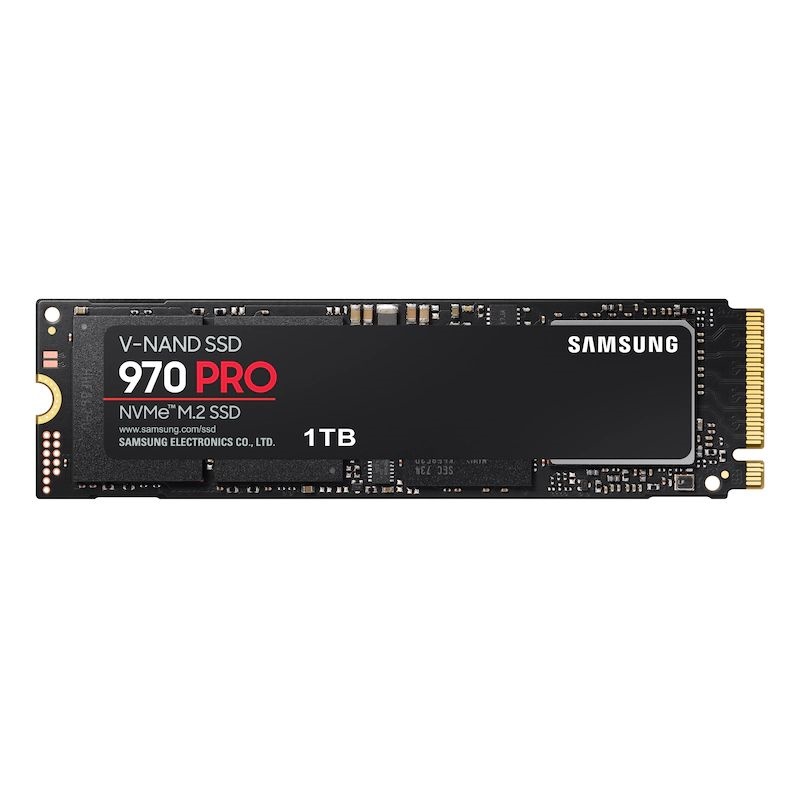


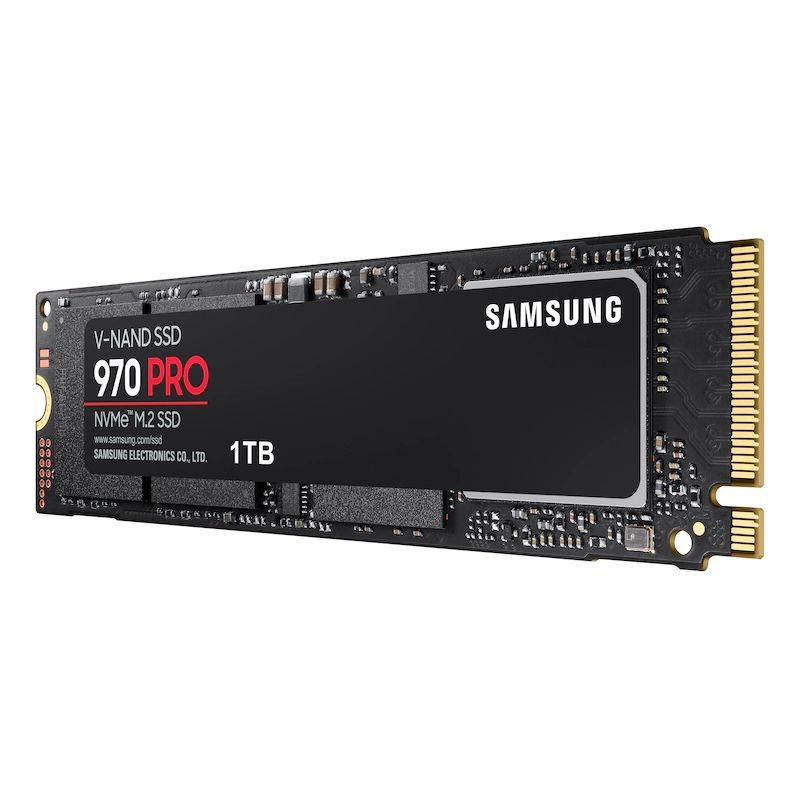
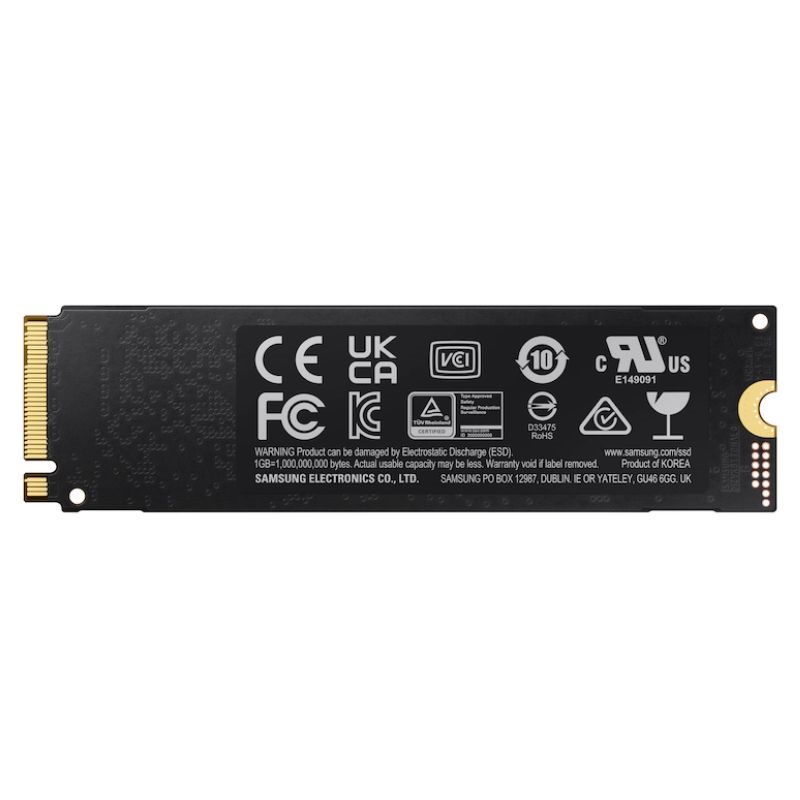
Samsung MZ-V7P1T0 970 PRO 1TB M.2 2280 PCIe NVMe Internal SSD. Excellent Refurbished with 1 Year Replacement Warranty
A high-performance internal solid-state drive designed for creators and power users who demand fast boot times, responsive apps, and reliable long-term operation.
Built to run day after day with dependable stability for professional workflows.
Drop-in upgrade for modern desktops, workstations, and laptops supporting NVMe over PCIe Gen3 x4.
The Samsung MZ-V7P1T0 970 PRO 1TB M.2 2280 PCIe NVMe Internal SSD sits in the professional-tier NVMe storage category, designed for buyers who value sustained performance, endurance, and reliability over entry-level price tags. Within the broader world of solid-state storage, this drive represents the traditional “PRO” positioning: premium NAND, robust controller design, and firmware that’s tuned for consistent throughput under heavy, real-world workloads. This category page covers the 970 PRO 1TB specifically, while also addressing the subcategory of performance M.2 NVMe drives aimed at gamers, creators, developers, and workstation users who need fast boot times, rapid asset loading, and dependable write behavior during long sessions.
As an M.2 2280 device, the 970 PRO fits the most common desktop and laptop slots, connecting directly to the motherboard without data cables. Its PCIe NVMe interface dramatically reduces latency compared to SATA SSDs, enabling a snappier system response across everyday tasks and professional pipelines. Buyers exploring this category typically compare the 970 PRO with other NVMe Gen 3 x4 drives, newer PCIe Gen 4 options, and high-end SATA models when upgrading from hard drives or earlier-generation SSDs.
The 970 PRO belongs to the M.2 2280 NVMe category. “M.2” is the physical connector and card format; “2280” means 22 mm wide by 80 mm long; and “NVMe” indicates the protocol used on top of PCI Express lanes. For shoppers unfamiliar with NVMe, this interface represents a leap beyond SATA by allowing the SSD to communicate more directly with the CPU, reducing overhead and unlocking higher throughput. Most modern ATX, micro-ATX, and mini-ITX motherboards offer two or more M.2 slots; many gaming and creator laptops provide at least one.
On the 970 PRO, the PCIe 3.0 x4 link delivers ample bandwidth for operating systems, applications, and heavy project files. Even as PCIe 4.0 and 5.0 options exist, PCIe 3.0 x4 remains broadly compatible and more than fast enough for many workflows. For buyers upgrading from SATA, the difference is immediately noticeable: reduced application load times, quicker system starts, and more responsive multitasking.
The Samsung 970 PRO 1TB is known in this category for strong real-world performance and excellent consistency over time. Whereas some drives peak briefly and then throttle or dip under sustained loads, the PRO heritage emphasizes durable speed during long file transfers, compilation runs, 4K/8K scrubbing, or virtual machine workloads. Buyers moving from SATA SSDs often experience a sizable jump in responsiveness, while those stepping up from earlier NVMe models typically notice improved stability under heavy I/O.
In practical terms, consistent performance means fewer slowdowns during extended write bursts, less variability when batch-processing large media libraries, and predictable behavior during complex multitasking. This is particularly important for professional users who need deadlines met and throughput that doesn’t collapse mid-project. The 970 PRO’s controller and premium NAND help minimize dips once the drive’s cache is saturated, keeping workflows smoother.
One hallmark of the 970 PRO category is endurance—how much data can be written over the drive’s lifetime. High endurance is central to professional workflows that write frequently: scratch disks, active project drives, and datasets that evolve continuously. Combining premium components with well-tuned firmware, the 970 PRO 1TB is built to withstand heavy write volumes, helping ensure a longer useful life under demanding conditions.
Thermal behavior is also crucial for performance stability. Like most NVMe drives, the 970 PRO benefits from some airflow and, if your motherboard includes one, a dedicated M.2 heatsink. While the drive is engineered to manage heat via internal mechanisms, adding a heatsink or ensuring case airflow helps maintain peak performance during long transfers or high ambient temperatures.
The 970 PRO integrates cleanly into a Samsung software ecosystem that typically includes a drive management utility and a migration tool. The management utility streamlines tasks like firmware updates, health diagnostics, performance optimization, and secure erase procedures. The migration component assists in cloning from an old drive to the 970 PRO, making upgrades straightforward even for users with limited time to reinstall an OS from scratch.
Hardware-based AES 256-bit encryption support helps protect data at rest when enabled through compatible platforms and management software. For organizations, integrating drive-level encryption into endpoint policies can simplify compliance and reduce risk. Always verify the encryption features you plan to use (e.g., OS-native BitLocker/eDrive configurations or vendor tools) and confirm motherboard and firmware compatibility.
Photographers and video editors benefit from quick previews, faster import/export, and real-time scrubbing of high-resolution footage. Large Lightroom catalogs, After Effects caches, or DaVinci Resolve optimized media can live comfortably on the 970 PRO. Its endurance gives creators confidence that frequent project writes won’t prematurely wear the drive.
Developers compiling large codebases, running local containers, or juggling multiple VMs appreciate the 970 PRO’s reduced I/O wait time and consistent throughput. Pulling dependencies, indexing source trees, and rebuilding modules all feel faster when the storage subsystem doesn’t bottleneck the CPU.
For gamers, the 970 PRO category offers speedy level loads and smoother streaming of high-resolution assets. Installed alongside a high-core-count CPU and modern GPU, it minimizes asset stutter and gets you back into the action faster. Streamers benefit from quick capture write-outs and responsive editing sessions between streams.
In small creative studios or home labs, the 970 PRO serves as a robust primary or scratch drive for local workstations. Its reliable behavior under continuous operations—rendering, compiling, test automation—makes it a practical foundation for teams that need consistent output without constant maintenance.
Shoppers evaluating the 970 PRO 1TB often weigh it against three alternatives: high-end SATA SSDs, mainstream NVMe drives (often TLC-based), and newer PCIe 4.0/5.0 models. The right choice depends on system compatibility, workload, and budget strategy.
The 1TB capacity point strikes a useful balance for most users, providing ample room for an operating system, essential applications, several large games, and active work projects. If you manage massive, multi-TB libraries, consider pairing the 970 PRO boot drive with larger SATA or NVMe secondary storage to keep the boot partition lean and fast. Keeping 10–20% of the drive free can also help the controller maintain performance over time by leaving space for background housekeeping.
Modern operating systems automatically enable TRIM and NVMe optimizations, but users can further fine-tune by disabling legacy defrag schedules for SSDs, aligning power plans for performance, and ensuring hibernation or indexing settings align with their workflow. On Linux, selecting an I/O scheduler optimized for NVMe and enabling periodic fstrim can keep performance healthy. On Windows, confirm that “Optimize Drives” shows the NVMe volume as “Solid-state drive.”
While the 970 PRO is built to handle heat efficiently, good case airflow or an M.2 heatsink helps sustain peak performance. Compact ITX builds benefit from a front intake to wash the motherboard with cool air, while mid-towers typically rely on a balanced front-to-rear pressure. Many modern boards ship with robust M.2 shields and thermal pads; install them carefully to ensure proper contact without overtightening the screw.
Moving from a hard drive to the Samsung 970 PRO 1TB is transformative. Boot times drop from minutes to seconds, large apps feel immediate, and system freezes during background copies become rare. Users coming from early SATA SSDs still notice more responsive multitasking and reduced wait times during heavy installs and updates. The ease of cloning with migration software makes the upgrade straightforward, even for laptops with a single M.2 slot when using a temporary NVMe USB enclosure for the clone process.
Even with a reliable drive, backups are non-negotiable. Pair the 970 PRO with versioned backups to external SSDs, NAS, or cloud services. Consider a 3-2-1 strategy: three copies of data, two local on different devices, and one off-site. For professional teams, centralized backup and monitoring ensure that high-value assets remain recoverable after accidental deletion, ransomware, or hardware failure elsewhere in the pipeline.
NVMe drives distribute writes evenly across NAND cells to extend lifespan. Keeping some free space and avoiding unnecessary write amplification—like repeatedly defragmenting or redirecting caches to slow disks—helps maintain the 970 PRO’s premium endurance profile. Over time, periodic health checks through drive management utilities can guide replacement planning before the drive reaches its wear limit.
While the 970 PRO is primarily a client/workstation drive, small studios and departments use it effectively in power desktops where reliability and consistent write behavior matter. For multi-user environments, deploying standardized imaging and health-monitoring processes simplifies fleet maintenance. Keeping firmware aligned across systems reduces edge-case support issues and ensures predictable performance benchmarks across teams.
NVMe software RAID in the OS can aggregate capacity or mirror for redundancy, but always weigh complexity and recovery procedures. For creators, mirroring critical work volumes may be more valuable than striping for speed; your bulk media can live on a larger secondary volume or NAS where snapshots and versioning protect against accidental overwrites.
The Samsung MZ-V7P1T0 970 PRO 1TB M.2 2280 PCIe NVMe Internal SSD is positioned for buyers who want workstation-grade reliability in a compact form factor. It provides swift application launches, rapid project iteration, and consistent throughput that helps creative professionals, gamers, and developers maintain momentum. This category’s emphasis on endurance and sustained speed makes it an ideal primary boot drive or a dedicated scratch/working drive in mixed storage setups.
For mixed use—OS, creative apps, and a rotating set of active projects—1TB provides breathing room without overspending. Gamers can maintain a core library and rotate in new releases while archiving older titles to secondary storage. Creators can keep current projects local on the NVMe for speed and archive finished assets to HDD, NAS, or external SSDs to free up space as needed.
Developers benefit from the 970 PRO’s low latency when pulling packages, installing dependencies, and compiling large codebases. For containerized workflows, storing images and volumes on NVMe accelerates container startup, log access, and rebuilds.
For professionals handling sensitive projects, drive-level encryption can be part of a broader defense-in-depth strategy. Combine strong encryption with endpoint management, secure boot policies, and versioned backups to protect IP and meet client requirements. When it comes time to repurpose or retire the drive, secure erase features within the vendor utility help ensure data is cleared appropriately before redeployment or recycling.
Enthusiasts may wish to tune NVMe queue depths, explore over-provisioning, or adjust power states for a balance of performance and acoustics. While the 970 PRO is designed to deliver excellent results out of the box, careful BIOS/UEFI settings (e.g., enabling the latest NVMe features, verifying PCIe slot bandwidth allocations) can improve edge-case behavior in complex builds with multiple GPUs, capture cards, or additional NVMe drives.
In dual-boot or multi-OS systems, confirm partition alignment and that each OS recognizes the NVMe drive with the expected feature set enabled. When migrating from legacy installations, it may be worth performing a clean install to guarantee optimal boot configuration and to remove years of accumulated cruft that can mask the performance of a fast NVMe.
One subtle advantage of M.2 NVMe storage is silent operation. Eliminating spinning disks in a primary workstation lowers ambient noise and vibration, which is especially appreciated in creative studios and recording environments. Efficient NVMe drives also reduce system power draw compared to high-RPM HDDs during active work, contributing to cooler, quieter builds and potentially extending component longevity by reducing heat accumulation in small cases.
Even as bleeding-edge PCIe standards push theoretical performance higher, there’s enduring value in a mature, well-understood platform like PCIe 3.0 NVMe—especially when paired with premium components and firmware tuned for real workloads. The 970 PRO 1TB remains a smart upgrade in systems where stability, endurance, and consistent speed matter more than peak benchmark scores. The result is a build that feels fast every day, stays that way through heavy use, and integrates cleanly with existing tools and workflows.
The Samsung MZ-V7P1T0 970 PRO 1TB M.2 2280 PCIe NVMe Internal SSD belongs to a category prized for professional reliability and day-to-day responsiveness. It transforms older builds, complements modern systems, and supports complex creative and development pipelines with consistent, predictable performance. Whether you’re planning a quiet SFF workstation or refreshing a trusted tower for another cycle of production, the 970 PRO category delivers a refined balance of speed, stability, and endurance that keeps your workflow moving.


 Contact Us
 Information
 Catalog
 Solid State Drives (SSD)
 Network Switches
 Hard Disk Drives
 HBA & Controllers
 PC & Servers
 PC & Server Memory
 CPU & Processors
 Network Routers
 Power Supplies
 Tape Drives & Libraries
 Network Devices
 Computer & Network Cables