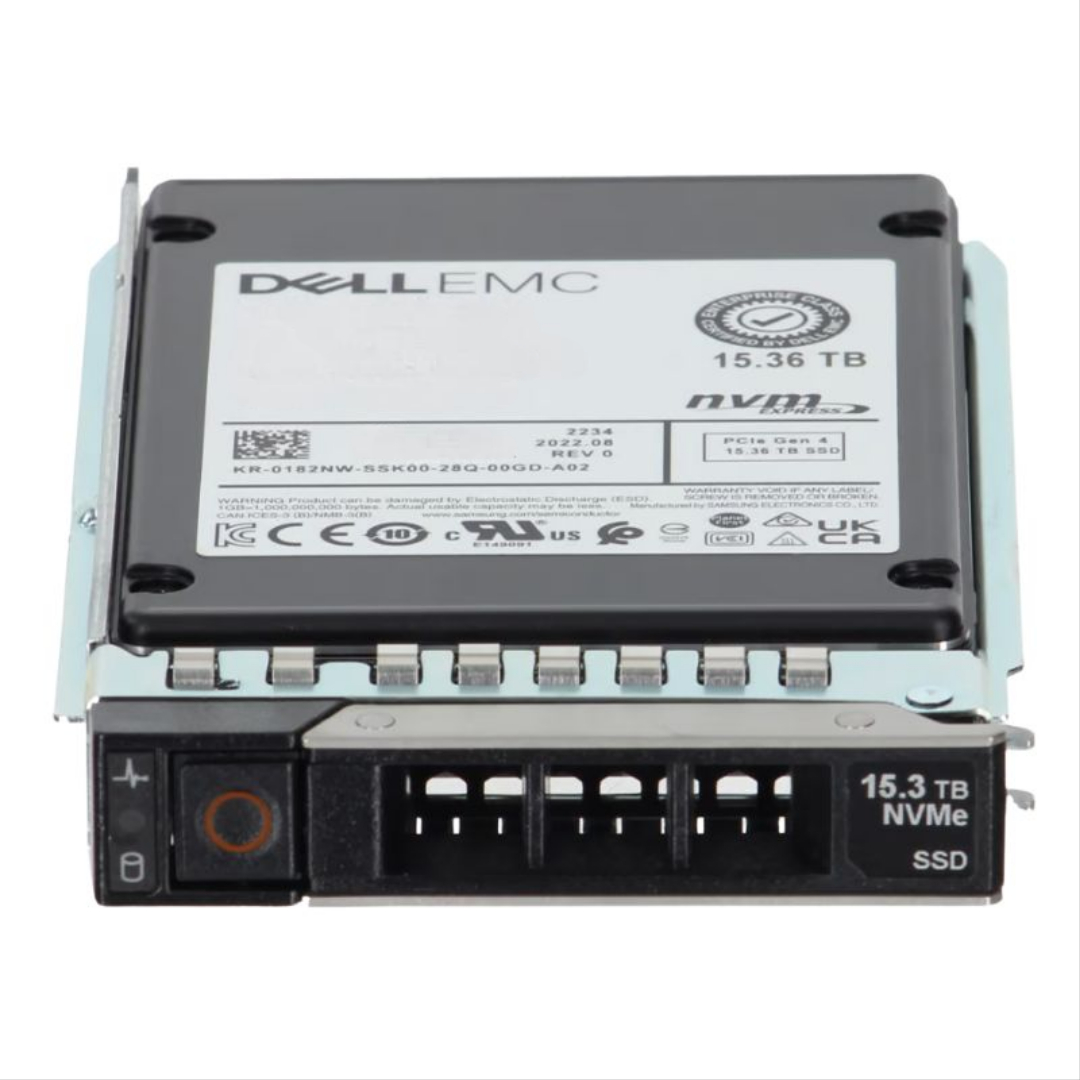
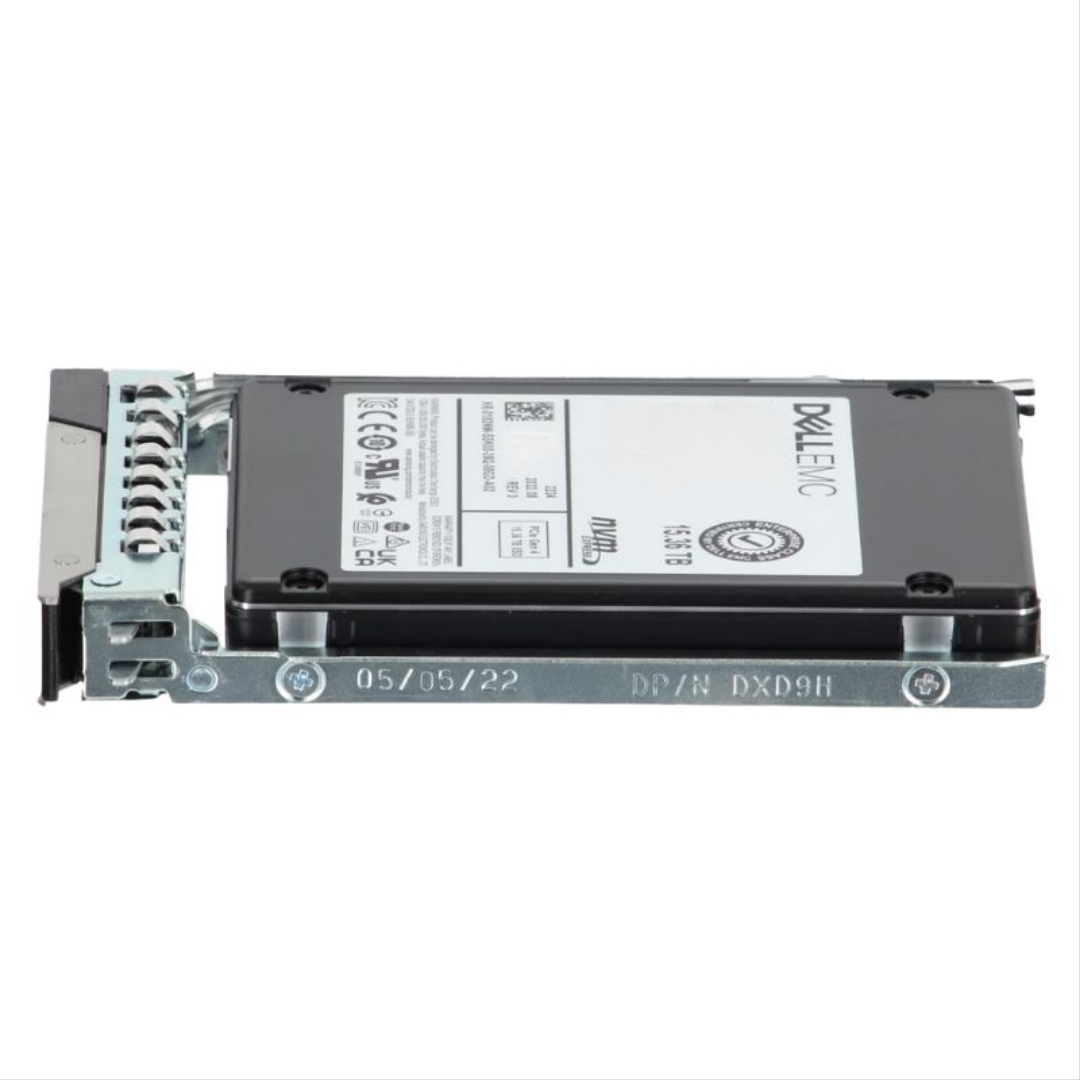
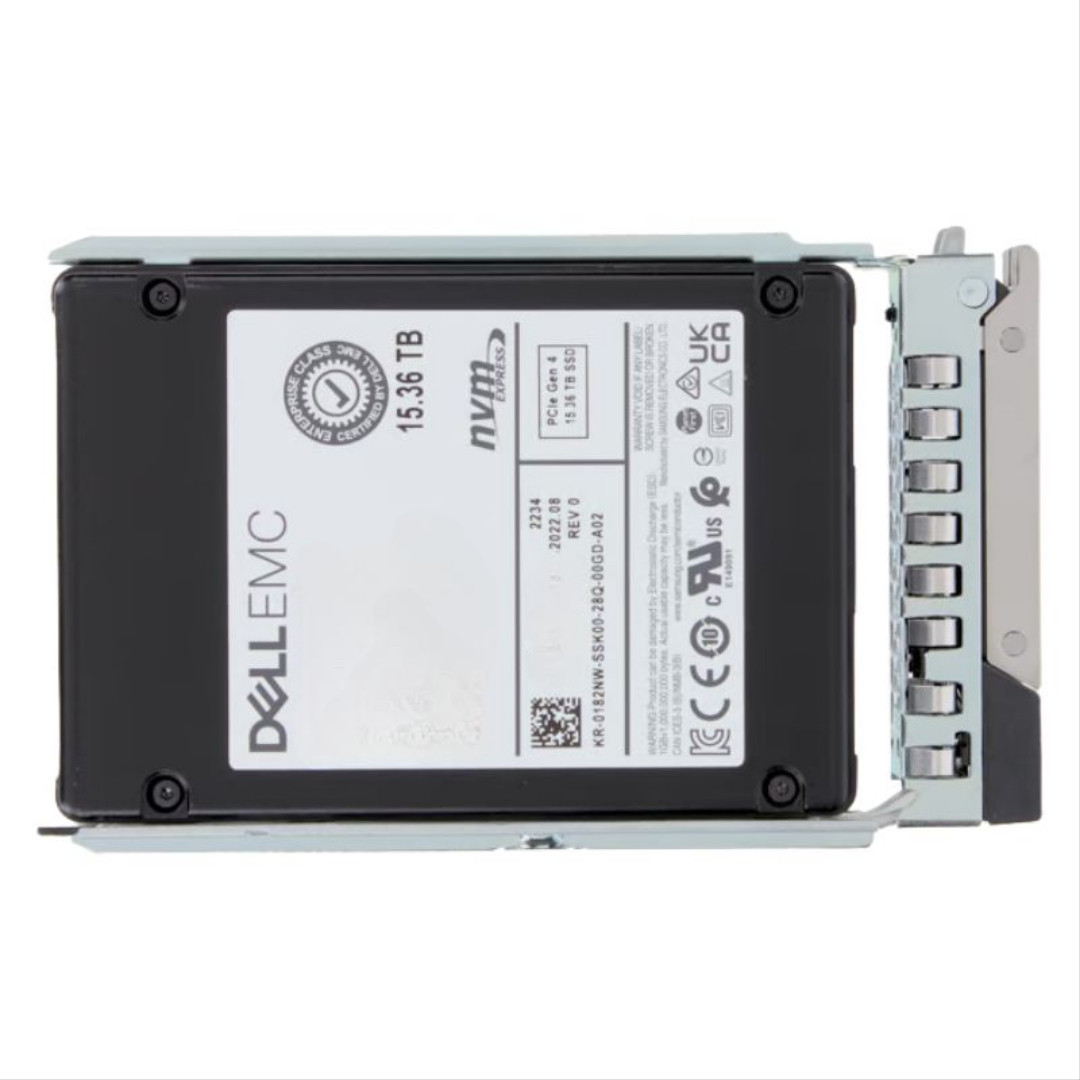
345-BJBF Dell 15.36TB PCIe Gen4 NVMe U.2 SSD.
- — Free Ground Shipping
- — Min. 6-month Replacement Warranty
- — Genuine/Authentic Products
- — Easy Return and Exchange
- — Different Payment Methods
- — Best Price
- — We Guarantee Price Matching
- — Tax-Exempt Facilities
- — 24/7 Live Chat, Phone Support
- — Visa, MasterCard, Discover, and Amex
- — JCB, Diners Club, UnionPay
- — PayPal, ACH/Bank Transfer (11% Off)
- — Apple Pay, Amazon Pay, Google Pay
- — Buy Now, Pay Later - Affirm, Afterpay
- — GOV/EDU/Institutions PO's Accepted
- — Invoices
- — Deliver Anywhere
- — Express Delivery in the USA and Worldwide
- — Ship to -APO -FPO
- — For USA - Free Ground Shipping
- — Worldwide - from $30
Dell 345-BJBF 15.36TB PCIe Gen4 NVMe U.2 SSD — Enterprise-grade Capacity & Reliability
The Dell 345-BJBF 15.36TB PCIe Gen4 NVMe 2.5-inch U.2 solid state drive is engineered for data-centre workloads that prioritise high capacity, low latency and consistent read performance. Designed as a hot-swappable enterprise drive with a drive tray, this U.2 module integrates seamlessly into Dell PowerEdge 14G, 15G, 16G and 17G servers, delivering large-scale storage in a compact 2.5" footprint.
Core Specifications
Product identity
- Manufacturer: Dell
- Model / Part Number: 345-BJBF
- Product Class: Enterprise Solid State Drive (SSD)
- Form Factor: U.2 (2.5-inch), hot-swap capable
Technical specifications
- Interface: PCIe Gen4 NVMe — maximises throughput and lowers I/O latency
- Storage Capacity: 15.36 TB (raw)
- Flash Type: 3D TLC NAND — balanced for density and performance
- Endurance Profile: Read-intensive (1 DWPD or as specified) — optimised for heavy-read workloads
Performance & Endurance
Built to take advantage of PCIe Gen4 bandwidth, the Dell 345-BJBF provides substantially higher sequential and random read throughput compared with Gen3 drives. Its read-focused endurance rating makes it ideal for workloads where reads dominate, including large-scale analytics, content delivery, virtualization reads, and database lookups. The 3D TLC NAND provides excellent storage density at a cost-efficient price point for enterprise deployments.
Why this drive performs
- PCIe Gen4 NVMe interface reduces protocol overhead and increases IOPS potential compared with SATA/SAS drives.
- U.2 form factor enables front-accessible, hot-pluggable serviceability in rack servers.
- Read-optimized firmware tuning prioritises latency stability and predictable read throughput under sustained load.
Compatibility & Server Support
The Dell 345-BJBF is certified for Dell PowerEdge platforms and ships with a server-ready tray for easy insertion and removal. It is expressly validated for PowerEdge 14G through 17G generations, ensuring firmware and hardware interoperability when used in supported Dell configurations.
Supported systems (typical)
- Dell PowerEdge 14G series (select models)
- Dell PowerEdge 15G series
- Dell PowerEdge 16G series
- Dell PowerEdge 17G series
Notes on interoperability
Always confirm your server’s firmware and HBA/RAID controller compatibility before deployment. While the drive is U.2 NVMe, some servers may require BIOS, firmware or driver updates to unlock full PCIe Gen4 speeds or NVMe pass-through functionality.
Use Cases — Where this SSD Excels
The 15.36TB Dell 345-BJBF is tailored to environments that require vast read capacity and fast accessibility with minimal physical rack space. Typical workloads include:
- Content delivery networks and media streaming caches where read throughput is critical.
- Large-scale analytics and BI platforms that frequently scan large datasets.
- Virtual desktop infrastructure (VDI) with heavy read/cache activity.
- Read-mostly database applications, OLAP reporting, and search indexes.
Practical Advantages for IT Teams
Adopting the Dell 345-BJBF offers tangible operational benefits. Its hot-swap U.2 design simplifies field replacements and reduces downtime. High capacity per drive reduces the number of devices required, shrinking rack space and simplifying storage management. Read-optimised endurance lowers cost-per-gigabyte for read-dominant workloads compared with higher-endurance models designed for mixed or write-heavy usage.
Management and maintenance
- Hot-pluggable tray enables rapid serviceability without powering down compatible servers.
- Dell firmware updates and diagnostic tools (when available in your environment) help monitor drive health and maintain optimal operation.
- Consolidating capacity with high-density drives simplifies firmware rollouts and capacity planning.
Installation & Best Practices
For reliable operation and peak performance, follow these recommended steps when deploying the Dell 345-BJBF:
- Verify server compatibility and update BIOS/firmware and NVMe drivers to the latest supported versions.
- Install the drive into the supplied Dell drive tray and insert into a supported U.2 bay.
- Configure storage at the OS or hypervisor level using NVMe-aware tools — avoid legacy SAS/SATA abstractions that can limit Gen4 performance.
- Monitor SMART/NVMe telemetry and schedule regular firmware checks to maintain stability.
Security, Reliability & Warranty Considerations
Enterprise Dell SSDs typically include features and firmware tuned for data integrity and predictable behaviour. When procuring this model, confirm the specific warranty and support coverage with your Dell reseller or service agreement, and whether enterprise data path protections (power-loss protection, end-to-end data path integrity) are part of the drive’s specification in your region.
Data protection tips
- Implement RAID or software-based redundancy appropriate to your availability requirements — note that NVMe drives operate differently from SAS/SATA devices in controller behavior.
- Keep offsite backups of critical datasets — high capacity reduces the number of drives but doesn’t replace a robust backup strategy.
- Use server management tools to schedule proactive health checks and predictive replacement when SMART/NVMe indicators suggest degradation.
Shopping & Deployment Advice
When evaluating the Dell 345-BJBF 15.36TB PCIe Gen4 NVMe U.2 SSD for your infrastructure, consider total cost of ownership (TCO) rather than just purchase price. Key factors to weigh include the drive’s read-oriented endurance, expected workload profile, power and cooling in your chassis, and the savings from higher density (fewer drives, less rack space, fewer interconnects).
Checklist before purchase
- Confirm Dell PowerEdge model and generation match supported server list.
- Ensure your backplane/controller supports U.2 NVMe and PCIe Gen4 lanes for full throughput.
- Verify vendor warranty, RMA procedures, and availability of spare trays if needed.
- Plan for firmware updates and integration into existing monitoring/management stacks.
Quick Specification Summary
- Part Number: 345-BJBF
- Capacity: 15.36 TB
- Interface: PCIe Gen4 NVMe
- Form Factor: U.2, 2.5-inch, hot-swap
- Flash: 3D TLC NAND
- Endurance: Read-intensive (1 DWPD or vendor-specified)
- Compatible Servers: Dell PowerEdge 14G / 15G / 16G / 17G (select models)
Frequently Asked Questions
Is the Dell 345-BJBF suitable for write-heavy databases?
This model is optimised for read-dominant workloads. For write-intensive transactional databases you should consider higher-endurance SSDs rated for greater DWPD to avoid premature wear.
Can I use this drive in non-Dell servers?
While the U.2 NVMe standard is broadly supported, full compatibility, firmware management and warranty coverage are best ensured when used in supported Dell PowerEdge systems. If deploying in non-Dell hardware, check that the chassis/backplane supports U.2 NVMe and that thermal and firmware considerations are addressed.
Does the drive require a special NVMe driver?
Most modern operating systems include NVMe drivers; however, to achieve peak PCIe Gen4 performance and ensure vendor-specific features work correctly, use drivers and firmware recommended by your server vendor.
Closing technical note
The Dell 345-BJBF 15.36TB PCIe Gen4 NVMe 2.5" U.2 SSD combines very high density with read-optimised firmware and enterprise serviceability. It’s a compelling option for organisations that need massive read capacity in PowerEdge servers while minimising rack footprint and simplifying drive management. Always validate compatibility and support terms with Dell or your authorised reseller before procurement.
Dell 345-BJBF — Enterprise U.2 NVMe SSD Overview
The Dell 345-BJBF 15.36TB PCI-E Gen4 NVMe 2.5" U.2 Read-Intensive 1 DWPD Enterprise SSD (with tray) is a high-capacity, rack-optimized solid state drive engineered for modern PowerEdge servers. It targets read-heavy enterprise workloads—analytics, virtualization, large-scale caching, content delivery, and database read replicas—offering a blend of very large raw capacity (15.36 TB), the low latency of NVMe over PCIe Gen4, and server-friendly U.2 (2.5" SFF) form factor and tray for hot-swap serviceability.
Why this SSD fits modern data centers
- Massive single-drive capacity: 15.36 TB in a 2.5" U.2 package reduces rack space and simplifies storage tiers compared with many smaller drives.
- NVMe + PCIe Gen4 performance: PCIe Gen4 x4 NVMe delivers substantially higher throughput and lower latency than SATA/SAS alternatives—ideal for high-IOPS read workloads and database acceleration.
- Read-intensive endurance profile: a 1 DWPD (drive writes per day) endurance rating balances cost and longevity for read-dominant environments such as streaming, analytics, and caching.
- Tray and server compatibility: delivered with a Dell-compatible carrier/tray so it installs cleanly into PowerEdge 14g, 15g, 16g and 17g hot-swap bays.
Technical specifications (concise)
Key hardware attributes
- Capacity: 15.36 TB raw.
- Interface: PCIe Gen4 x4 (NVMe) — U.2 (2.5" SFF) electrical and mechanical form factor.
- Endurance class: Read-Intensive (typically 1 DWPD).
- NAND type: Enterprise-grade TLC (often with controller optimizations for endurance and read performance).
- Power & thermal: Designed to operate in server chassis with typical enterprise power/thermal profiles; supports power-loss protection and enterprise reliability features on many builds.
- Form factor & tray: 2.5" U.2 SFF with Dell carrier (DXD9H / vendor tray) for hot-swap insertion in supported PowerEdge generations.
Performance snapshot (what to expect)
Although actual throughput/IOPS vary by firmware and system configuration, Gen4 U.2 enterprise drives of this class commonly advertise sequential reads in the multi-GB/s range and sustained read performance that is multiple times faster than SAS alternatives—enabling faster boot, quicker database reads, and reduced query latency. Typical vendor listings for comparable Dell 15.36 TB Gen4 U.2 SSDs advertise sequential reads up to ~6,000–7,000 MB/s and write figures suitable for read-intensive profiles.
Compatibility & server integration
PowerEdge server support
The 345-BJBF (and the 15.36 TB Gen4 U.2 variants Dell lists) are commonly sold with Dell part numbers and carriers that explicitly state compatibility with Dell PowerEdge 14th through 17th generation servers (14g, 15g, 16g, 17g). These drives are engineered to plug into the hot-swap bays and be recognized by Dell firmware/BIOS arrays and controller backplanes used in those generations—making them a drop-in storage upgrade for many existing Dell racks. Always verify the specific PowerEdge model's NVMe/U.2 bay support in your server's technical manual before purchase.
How the carrier/tray matters
Dell supplies these enterprise drives as kits that include a drive carrier/tray (DXD9H or similar). The tray provides mechanical fit, front-bay eject lever alignment, and firmware/host identification consistency. If you are migrating drives between server generations, confirm the tray model and confirm the drive firmware is compatible with the server's storage firmware policy.
Firmware and ecosystem considerations
- OEM firmware: Dell-branded SSDs typically ship with Dell-tuned firmware that improves interoperability with PowerEdge management utilities (iDRAC, OMSA) and may add features like NVMe-MI or drive health reporting.
- BIOS and HBA/RAID support: Some servers require BIOS/firmware updates or NVMe HBA firmware to fully support Gen4 speeds and large addressable capacities—check Dell's release notes.
- Management & telemetry: Use iDRAC or vendor utilities to monitor SMART, NVMe telemetry, temperature and endurance metrics for proactive maintenance.
Workloads that benefit most
Primary use cases
- Analytics & data warehousing: Fast random/sequential read performance speeds complex queries and large dataset scans.
- Virtual desktop infrastructure (VDI): High read density and low latency improve boot storms and user experience when many VMs read the same golden images.
- Content delivery and streaming caches: Large capacity + read focus makes one drive hold more cached objects and serve them faster.
- Database read replicas & reporting servers: Read-heavy replicas enjoy longer life and lower cost-per-TB with a 1 DWPD R-I drive than with higher-endurance, higher-cost devices.
- Large scale file caches and metadata stores: Many metadata operations are read dominated—this drive shifts IO pressure away from backend disks and reduces latency at scale.
When to choose something else
- If your workload is write-intensive (frequent large writes, heavy logging, or intensive database primary shards), consider higher DWPD (Mixed-Use / Endurance) SSDs to extend service life and maintain performance.
- For latency-critical OLTP primary databases that see constant writes, an NVMe drive with power-loss protection and higher endurance profile may be recommended.
Deployment & best practices
Installation checklist
- Confirm server model and NVMe/U.2 bay support in PowerEdge documentation.
- Apply the latest server BIOS and storage backplane firmware before inserting Gen4 devices.
- Install the drive in the official Dell carrier/tray included with the kit for correct firmware IDs and hot-swap operation.
- Provision NVMe namespaces, and if using software RAID or a NVMe-aware storage stack, test failover and performance in a staging environment.
- Enable monitoring (iDRAC / OMSA / NVMe management tools) to track TBW, temperature, and SMART/NVMe health metrics from day one.
Thermal & power considerations
PCIe Gen4 NVMe U.2 drives with high density and performance can run warmer than lower-speed/SAS SSDs. Ensure adequate airflow within the chassis and that your server's thermal profile supports sustained throughput. Some data centers choose to pair Gen4 storage with adjusted fan curves or dedicated NVMe airflow channels to maintain consistent performance.
Data protection strategies
- RAID & erasure coding: Use RAID-1/10 or erasure coding for critical datasets; NVMe drives are often used as cache or tier-0 where a mix of high-speed mirrors and lower-cost bulk storage provides optimal costs.
- Backups: Even enterprise drives should be part of a layered backup strategy—regular snapshots and off-host backups reduce recovery time after a rare failure.
- Firmware validation: Keep drive firmware in sync with vendor best practices; Dell often documents compatibility advisories for specific PowerEdge platforms.
Operational economics and ROI
Cost per usable TB & consolidation
A single 15.36 TB U.2 SSD reduces the number of drives and backplanes required to reach a given tier capacity. For read-heavy workloads this consolidation can reduce rack space, cabling complexity, and administrative overhead. While per-GB prices for enterprise NVMe Gen4 drives are higher than bulk SATA/SAS HDDs, the operational gains—reduced latency, higher IOPS density, and potential savings on compute time for analytics workloads—often justify the premium in performance-sensitive environments. Vendor listings for Dell 15.36 TB NVMe parts can vary widely in price depending on new vs refurbished condition; plan acquisition budget accordingly.
Endurance economics
Choosing a read-intensive drive (1 DWPD) lowers purchase cost relative to mixed-use or write-intensive variants. The tradeoff is that write-heavy workloads will consume TBW faster. Map your expected daily writes and uplift factor for peaks to projected TBW to estimate service life and replacement cadence. If writers are modest, a 1 DWPD enterprise NVMe drive often hits a strong price/performance sweet spot.
Vendor & model variants — what the part numbers mean
Common Dell/MPN examples
Dell often sells similar physical drives under multiple part numbers depending on firmware, encryption (SED vs non-SED), speed grade, and bundled carrier. Examples of Dell part numbers for 15.36 TB U.2 Gen4 products include T36Y2, 182NW, and vendor kit numbers like 400-BMVJ—these listings describe the same capacity and physical form factor with subtle differences in firmware or kit contents. When ordering, use the exact MPN to ensure you receive the firmware/SED configuration you expect.
Genuine Dell kits vs. third-party equivalents
Authorized Dell kits include Dell-branded firmware and the exact carrier model; third-party sellers may resell factory Dell parts (new or refurbished) or sell equivalent OEM drives (Solidigm, Samsung, Kioxia) repackaged for Dell bays. If your environment requires full vendor warranty and Dell support contracts, procure through official Dell channels or authorized resellers.
Testing, benchmarking & real-world performance notes
How to benchmark
To accurately measure the 345-BJBF or comparable 15.36 TB Gen4 U.2 drives, use NVMe-capable benchmarking tools (fio, vdbench, or vendor utilities) across realistic queue depths and block sizes for your workload. Synthetic sequential tests show peak throughput; real-world application tests (e.g., database OLAP queries, VDI boot storms) reveal latency under mixed IO patterns. Always test in the same chassis and OS configuration intended for production.
Observed behavior in enterprise environments
- For read-heavy datasets, these drives consistently cut query times and boot times compared with SAS drives.
- Sustained sequential reads will demonstrate Gen4 advantages; random small-block IO benefits from NVMe queueing and high IOPS headroom.
- Performance under thermal throttling degrades; ensure chassis cooling is adequate for sustained peak workloads.
Security, compliance & encryption
SED and data-at-rest protection
Some Dell enterprise SSD SKUs are offered with Self-Encrypting Drive (SED) capabilities or with FIPS-compliant firmware depending on the underlying NAND/controller vendor. If you require FIPS compliance or hardware encryption, order the SKU that explicitly states SED/FIPS certification and confirm your key management solution (KMIP) or HSM integration.
Supply chain and lifecycle policies
Large organizations should track drive firmware versions and the vendor lifecycle policy for replacement parts—enterprise SSD providers publish firmware advisories, end-of-life notices, and recommended update paths. Maintain an inventory of part numbers and firmware to streamline support escalations with Dell.

Buying guide & checklist
Before you buy
- Confirm the exact model/MPN (e.g., Dell T36Y2 / 400-BMVJ / 182NW or 345-BJBF) and whether the carrier is included.
- Decide if you need SED or FIPS certification and order the correct SKU if so.
- Match endurance (1 DWPD for read-intensive) to your write profile and calculate projected TBW consumption.
- Plan for firmware updates and ensure your PowerEdge server generation supports NVMe Gen4 drives or requires BIOS firmware updates.
Procurement tips
- Buy from an authorized Dell reseller when you need vendor support and to preserve warranty.
- For budget purchases, certified refurbished units from reputable resellers can be cost-effective—verify return policy and remaining warranty.
- Request full itemized MPN and firmware revision when purchasing at scale so you can match inventories and avoid unexpected incompatibilities.
Summary of advantages & potential tradeoffs
Advantages
- High single-drive capacity (15.36 TB) in a compact U.2/2.5" package—saves rack space and simplifies pool management.
- High read performance and NVMe/PCIe Gen4 bandwidth for analytics and caching tasks.
- Lower cost per TB versus higher-endurance NVMe models, making it attractive for read-dominated tiers.
- Packaged with Dell-compatible tray/kit for easy hot-swap deployment in PowerEdge servers.
Potential tradeoffs
- Not ideal for heavy, sustained write workloads—choose a higher DWPD SSD for write-heavy databases.
- Requires NVMe/U.2 support and possibly server firmware updates to achieve full Gen4 performance.
- Thermal management is important—insufficient airflow can lead to throttling under peak load.