
(7% discount is applied at checkout)
Cart is empty
Your go-to destination for cutting-edge server products
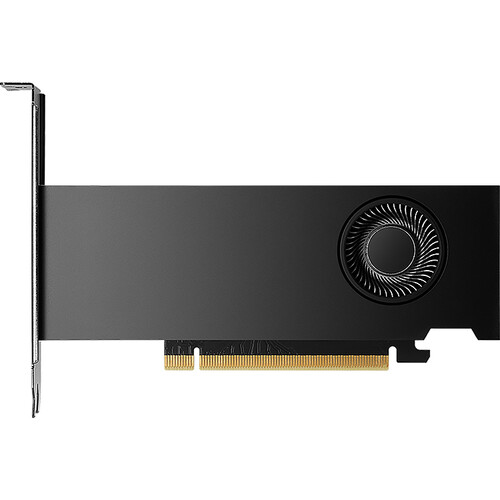
PNY Technology VCNRTX2000ADA-PB Nvi RTX 2000 16GB 128-bit GDDR6 PCI Express 4.0 GPU. New Sealed in Box (NIB) with 3 years Warranty. ETA 2-3 weeks. Call
The PNY VCNRTX2000ADA-PB (NVIDIA RTX 2000 Ada Generation) is a compact, professional-class graphics card built on the Ada Lovelace architecture. It ships with 16 GB of GDDR6 VRAM (with ECC) on a 128-bit memory bus, delivering a memory bandwidth in the low hundreds of gigabytes per second and a work-friendly, low-power thermal envelope. The card targets small workstations and compact chassis where full-size GPUs are impractical but professional performance, accelerated ray tracing, and AI inference features are required.
At its heart are thousands of CUDA cores (the RTX 2000 Ada class is commonly specified with figures in the 2,800 range), third-generation RT cores for hardware-accelerated ray tracing, and fourth-generation Tensor cores to accelerate AI workloads such as denoising, upscaling, and inferencing. This combination makes the card versatile for tasks that range from viewport rendering to accelerated AI-enhanced denoising and real-time visualization.
The Ada-based design emphasizes a strong performance-per-watt ratio. The low-profile, dual-slot form factor and modest maximum board power allow integrators to fit this GPU into small form factor (SFF) workstations, rack-mounted machines, and compact desktop builds while keeping thermals and power demands manageable.
Sixteen gigabytes of GDDR6 with optional error-correcting code (ECC) provides headroom for large texture sets, complex 3D scenes, and multi-layer video timelines. ECC improves reliability in professional workflows where silent data corruption is unacceptable—important in engineering validation, medical imaging visualization, and some high-precision compute situations.
The 128-bit memory interface defines the raw channel width available to the GDDR6 memory chips; coupled with GDDR6 clock rates this typically yields a sustained bandwidth profile suitable for mid-to-high resolution workloads such as 4K editing and multi-viewport CAD scenes. While not as wide as full workstation HBM solutions, the practical throughput supports responsive viewport interaction and large-frame buffering for many professional tools.
The card commonly provides four mini-DisplayPort outputs (mDP 1.4a), enabling multi-monitor set-ups, ultra-high resolutions up to 8K on supported displays, and high-refresh workstation panels. Multiple outputs are particularly valuable for designers, GIS professionals, and control-room applications where simultaneous views are required.
Using a PCIe 4.0 x8 host interface strikes a balance between bandwidth and compatibility. For most graphics and compute tasks targeted by this GPU, PCIe 4.0 x8 provides ample link throughput while allowing compatibility with motherboards that may share lanes among other devices. It also future-proofs connectivity as platforms adopt PCIe Gen4 and Gen5 ecosystems.
Designed for compact workstations, the card’s power draw is modest relative to full-length GPUs; this enables system builders to choose smaller power supplies while maintaining a high reliability window. Many retail and OEM configurations use an active cooler with an efficient blower or small axial fans combined with heat pipes to manage temperature in constrained chassis environments.
The low-profile dual-slot design reduces interference with other expansion cards and enables deployment in small-form-factor cases. Where length is constrained, pay attention to card height and bracket options; some kits ship with an unattached low-profile bracket for compatibility with smaller enclosures.
For editors working on 4K timelines, color grading, and compositing, this GPU offers a practical mix of memory capacity and shader throughput. It keeps multiple high-resolution frame buffers resident on the GPU, reducing frame scrubbing latency and making real-time playback of complex timelines more consistent.
Architects, BIM specialists, and 3D modelers benefit from fast viewport performance, responsive panning/zooming in heavy models, and ray-traced previews without the need for a full-size workstation GPU. The card’s memory size helps store large textures and multi-layer assets directly on the GPU for faster iteration.
While not a dedicated deep-learning supercard, the RTX 2000 Ada class is well-suited to model prototyping, small-to-medium notebook-sized dataset training, and accelerated inferencing. Developers who need a compact, cost-conscious GPU for local model iteration will find this product a pragmatic option.
Synthetic benchmarks (e.g., SPECviewperf, synthetic compute tests) are useful for head-to-head comparisons but do not always reflect real application performance. Real-world tests—rendering time in Blender, viewport framerate in CAD software, or export time in Premiere/DaVinci Resolve—are more indicative of user experience. When evaluating, consider both geometry-heavy and texture-heavy workloads.
In 3D visualization, expect faster scene navigation and quicker ray-trace previews compared to previous-generation entry GPUs. In video editing, using GPU-accelerated codecs and effects will reduce render and export times, particularly when the application can keep frame buffers on the GPU. AI-accelerated features such as denoising and upscaling will see latency and throughput improvements due to modern Tensor cores.
PNY and NVIDIA provide professional driver builds optimized for stability and certified application compatibility across popular creative and engineering suites. These drivers often include performance and reliability patches targeted at creative applications (renderers, CAD packages, DCC tools), and are recommended for production environments.
Developers and creative toolchains can leverage NVIDIA’s CUDA libraries, OptiX for ray tracing, and TensorRT/other AI runtimes to accelerate workloads. Many modern creative plugins (denoisers, upscalers, AI-assisted tools) explicitly use these frameworks to exploit on-GPU acceleration.
Although this card runs at a relatively low board power compared to full-fat workstation GPUs, system builders should ensure that the PSU can handle sustained loads along with CPU and storage. Plan for positive airflow through the chassis and avoid placing drives or cable bundles directly in the GPU’s intake path.
Before deploying the GPU in production machines, verify motherboard BIOS versions, PCIe lane allocation (especially in multi-card systems), and OS driver support. Some small-form-factor OEMs ship with fixed BIOS settings that may need updates to fully support certain professional GPU features.
Compared to consumer gaming cards with similar raw compute, the PNY RTX 2000 Ada is configured to favor professional memory features, multi-display support, and driver stability. It trades some raw gaming clock headroom for professional feature sets and ECC memory support in certain configurations.
Full-fat workstation GPUs (with HBM memory or larger memory buses) deliver higher raw memory bandwidth and more VRAM, making them better suited for the very largest datasets and multi-GPU rendering farms. The RTX 2000 Ada aims to provide a sweet spot for professionals who need serious capability without the form-factor and power overhead of larger cards.
Match the card’s strengths—multi-display capability, compactness, memory size—to your use case. For multi-viewport CAD, prioritize display outputs and VRAM; for accelerated rendering, prioritize compute throughput and driver support; for AI prototyping, check Tensor core generation and software compatibility.
A compact workstation using the RTX 2000 Ada will allow architects to run Revit, Enscape, and Twinmotion comfortably on a single GPU. The 16 GB of VRAM enables large material libraries and multi-model scenes to be kept GPU-resident for snappier interaction.
In an edit bay, editors can rely on GPU-accelerated effects and playback. When paired with fast NVMe storage and a multicore CPU, this card reduces timeline lag and shortens export times for 4K workflows.
Due to its modest thermal and power profile, the card is a candidate for remote workstation boxes and GPU-accelerated VDI builds where density and low power per slot matter. Verify vendor support for virtualization drivers if planning multi-user remote access.
Maintain updated professional drivers from the vendor to ensure optimal stability. Check certification matrices from major ISVs (Autodesk, Adobe, Dassault) if you run certified workflows—using validated driver builds can prevent subtle incompatibilities.
Keep chassis dust-free, confirm unobstructed airflow paths, and reapply thermal pads or replace fans only with manufacturer-recommended parts. A well-maintained compact workstation will keep the GPU performing within specification for many years.


 Contact Us
 Information
 Catalog
 Solid State Drives (SSD)
 Network Switches
 Hard Disk Drives
 HBA & Controllers
 PC & Servers
 PC & Server Memory
 CPU & Processors
 Network Routers
 Power Supplies
 Tape Drives & Libraries
 Network Devices
 Computer & Network Cables