Your go-to destination for cutting-edge server products
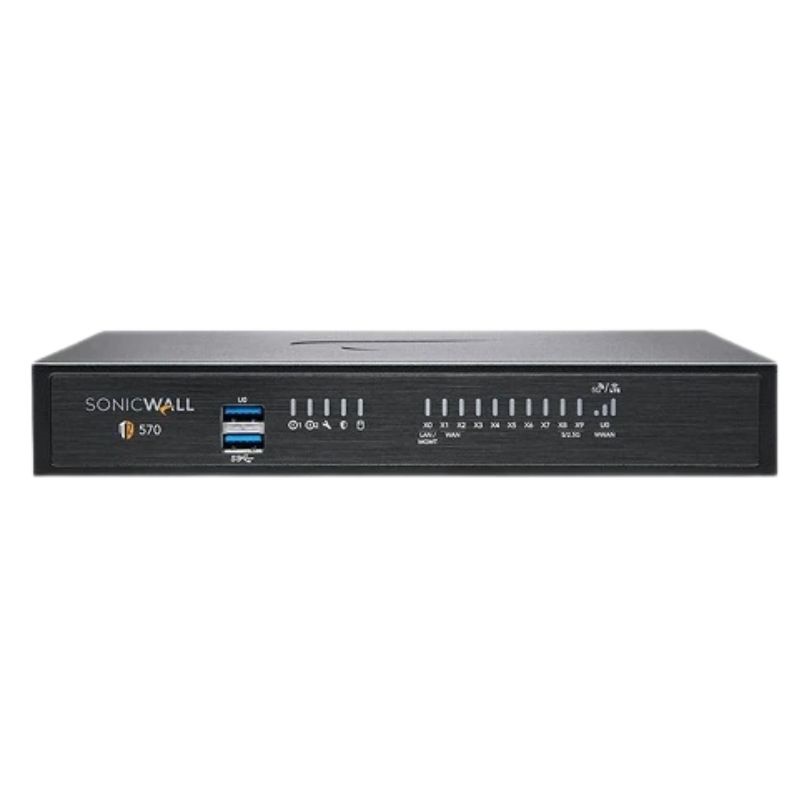
AB292095 Dell TZ570 14 Ports Gigabit Ethernet Next-generation Firewall

AB292095
* Product may have slight variations vs. image
Hover on image to enlarge

Brief Overview of AB292095

Dell AB292095 TZ570 14 Ports Gigabit Ethernet Network Security Appliance. Factory-Sealed New in Original Box (FSB)

Contact us for a price
Ask a question
Additional 7% discount at checkout
SKU/MPNAB292095Availability✅ In StockProcessing TimeUsually ships same day ManufacturerDell Manufacturer WarrantyNone Product/Item ConditionFactory-Sealed New in Original Box (FSB) ServerOrbit Replacement Warranty1 Year Warranty
Google Top Quality Store Customer Reviews
Our Advantages
Payment Options
  • — Visa, MasterCard, Discover, and Amex
  • — JCB, Diners Club, UnionPay
  • — PayPal, ACH/Bank Transfer (11% Off)
  • — Apple Pay, Amazon Pay, Google Pay
  • — Buy Now, Pay Later - Affirm, Afterpay
  • — GOV/EDU/Institutions PO's Accepted 
  • — Invoices
Delivery
  • — Deliver Anywhere
  • — Express Delivery in the USA and Worldwide
  • — Ship to -APO -FPO
  • For USA - Free Ground Shipping
  • — Worldwide - from $30
Description

Dell AB292095 TZ570 Next-Generation Firewall Appliance

The Dell AB292095 TZ570 represents a cutting-edge solution in network security, designed to safeguard modern businesses with advanced firewall protection, lightning-fast performance, and intelligent traffic management. With 14 Gigabit Ethernet ports, integrated VPN capabilities, and support for SonicOS 7, this device delivers unmatched reliability for enterprises, educational institutions, and data-driven organizations.

Comprehensive Product Specifications

  • Manufacturer: Dell
  • Part Number: AB292095
  • Product Type: Next-generation Firewall
  • Transport Protocol: Gigabit Ethernet
  • Remote Management: DHCP, SNMP, SSH
  • Number of Ports: 14

High-Performance Security Features

Built for today’s demanding IT environments, the Dell AB292095 TZ570 ensures uncompromised protection with industry-leading throughput levels:

  • VPN IPSec Throughput: 1.8 Gbps for secure connections across remote offices and mobile teams.
  • IPS Throughput: 2.5 Gbps for proactive threat detection and prevention in real time.

Advanced Interface Options

The appliance comes equipped with diverse interface types, enabling versatile deployment across complex network infrastructures:

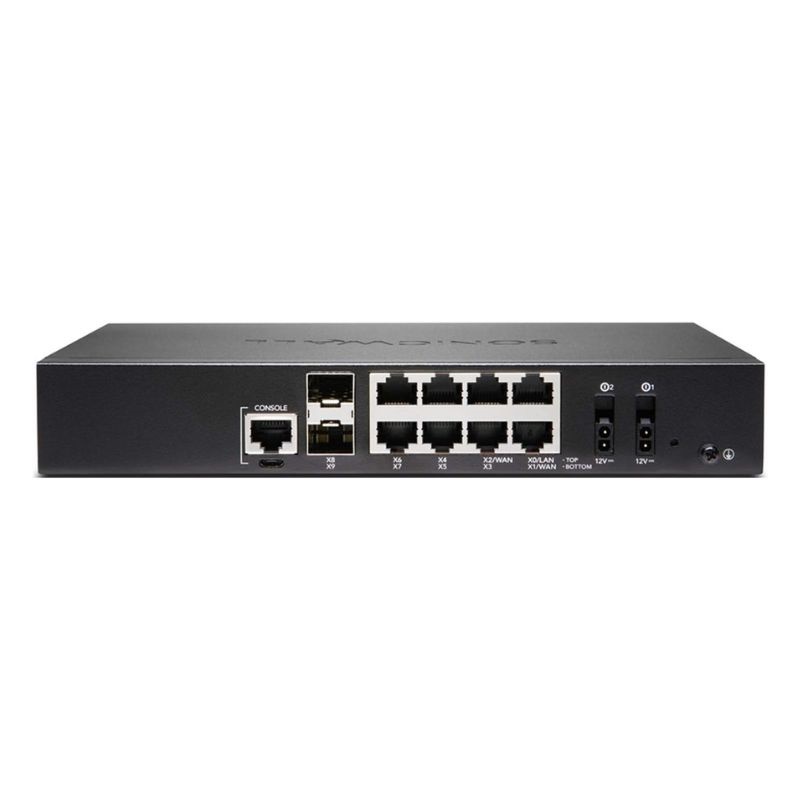
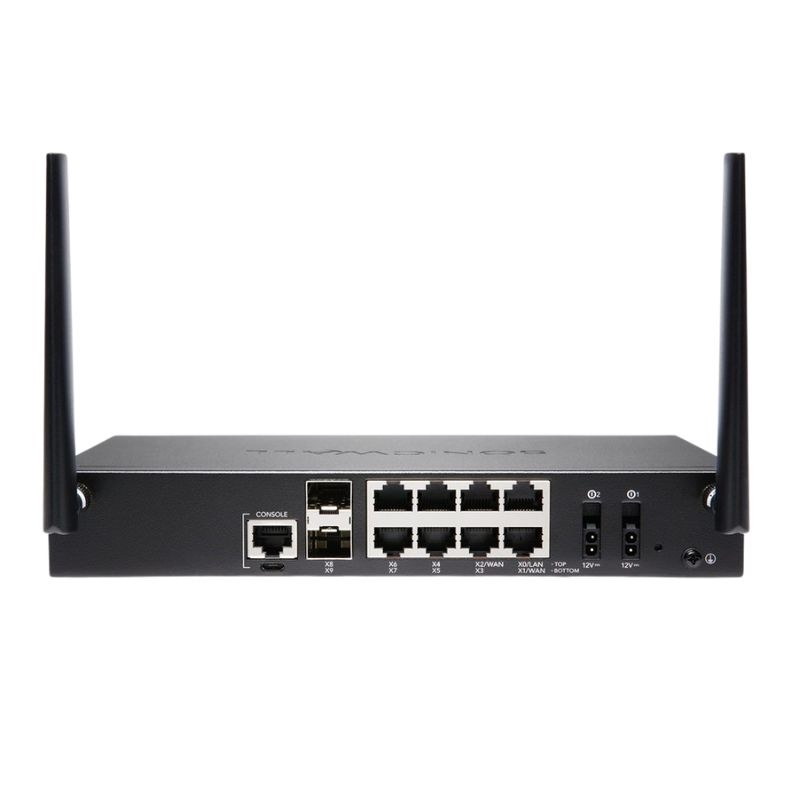
  • 8 × 1GbE Ports for standard connectivity
  • 2 × 5G SFP+ slots for fiber expansion and high-speed uplinks
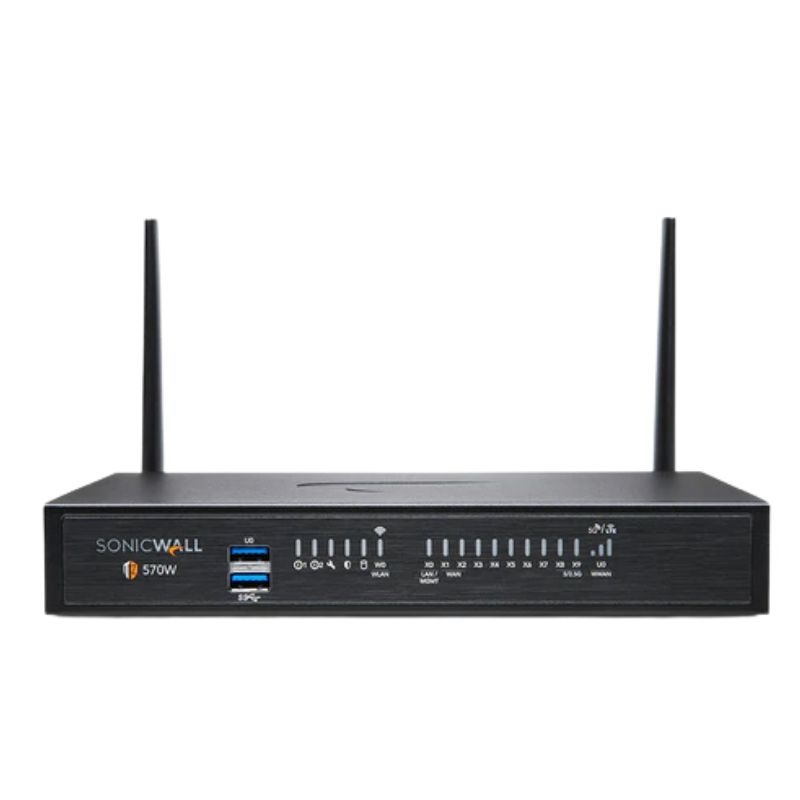
  • 2 × USB 3.0 Ports for device integration
  • 1 × Console Port for direct configuration
  • 1 × Micro-USB Console Port for added flexibility

Power Efficiency and Dependability

Power management is streamlined for energy-conscious organizations:

  • Max Power Consumption: 13.4 Watts
  • Input Voltage: 100–240 VAC, 50–60 Hz
  • Device Type: Integrated Power Supply

Operating System Compatibility

The firewall operates seamlessly on SonicOS 7, offering modernized features, streamlined GUI, and powerful automation for consistent network security policies.

Dell AB292095 TZ570 Firewall

Businesses across sectors prioritize the TZ570 because it provides more than just firewalling — it ensures continuous uptime, dynamic security protocols, and the ability to scale as your network grows. It supports VPN access for remote workers, real-time intrusion prevention, and multi-gigabit throughput for handling modern workloads.

Key Advantages

  • Future-ready hardware designed for expanding network demands.
  • Comprehensive security suite preventing malware, ransomware, and zero-day attacks.
  • Flexible remote access options ideal for hybrid and distributed workforces.
  • Energy-efficient architecture with low power draw, reducing operational costs.
  • Intuitive management with DHCP, SNMP, and SSH support for IT administrators.

Built for SMBs and Enterprises

Whether you’re a small business needing reliable protection or an enterprise handling massive data flows, the Dell AB292095 TZ570 adapts with ease. Its blend of scalability, streamlined deployment, and advanced monitoring tools make it suitable for a wide range of industries.

Flexible Deployment Options

  • Ideal for branch offices requiring high-speed secure connections.
  • Excellent for campus environments needing multiple interface options.
  • Robust enough for enterprise data centers demanding consistent uptime.

Networking Benefits of the TZ570

The appliance delivers significant benefits for networking infrastructure, enhancing overall performance and security posture:

Security-Driven Networking

  • Layered defense against evolving cyber threats.
  • Support for IPS, VPN, and traffic monitoring.
  • Streamlined administration with SonicOS 7 interface.

Performance Optimization

  • 2.5 Gbps IPS throughput ensures real-time threat mitigation without bottlenecks.
  • 1.8 Gbps VPN IPSec speed enables secure remote collaboration.
  • 14 total ports provide connectivity flexibility across varied setups.

Future-Proof Connectivity

Thanks to its SFP+ 5G ports, the TZ570 easily integrates into high-performance networks, offering speed and bandwidth for future scalability.

Business-Critical Reliability

Every detail of the Dell AB292095 TZ570 firewall reflects enterprise-grade dependability, from redundant interface options to efficient power usage, ensuring mission-critical services stay online at all times.

Enterprise-Ready Overview of the Dell AB292095  Next-Generation Firewall  

The Dell AB292095 TZ570 14 ports Gigabit Ethernet network security next-generation firewall appliance represents a highly capable security gateway engineered for organizations that need advanced protection, flexible connectivity, and simplified management in a compact footprint. As a category, 14-port Gigabit NGFW appliances address branch offices, multi-tenant environments, distributed enterprises, and midsize businesses that require granular policy controls across users, devices, and applications. Buyers evaluating this class of firewall typically look for a balanced blend of throughput, deep packet inspection, threat prevention services, high-availability options, and intuitive orchestration—all while maintaining cost efficiency and predictable licensing.

Within this category, the focal point is the ability to consolidate multiple security and networking roles: stateful firewalling, intrusion prevention, gateway anti-malware, content filtering, SD-WAN path selection, site-to-site and remote access VPN, and encrypted traffic inspection. The 14 dedicated Gigabit Ethernet ports provide dense connectivity for LAN, WAN, DMZ, and isolated VLAN segments without the need for additional switch modules in many small to medium deployments. This blend of features makes the Dell AB292095 TZ570 a practical anchor for zero-trust segmentation strategies, hybrid work, and cloud-connected workflows.

Positioning the 14-Port Gigabit NGFW in Modern Network Architectures

Fourteen copper Gigabit interfaces create a flexible canvas for cleanly segmenting traffic, isolating critical workloads, and enforcing least-privilege access. Typical deployments carve out zones for user access, servers, VoIP, IoT and OT devices, guest networks, and management-only enclaves. The platform’s policy engine then inspects traffic moving between zones, applying application-aware rules to permit, deny, or shape flows based on identity, device posture, risk level, and compliance requirements. This architecture brings consistency to security policy, even as branch networks evolve to include cloud-first apps, SaaS, and SD-WAN overlays.

  • LAN Density: Multiple Gigabit LAN ports allow direct attachment of workgroups without an immediate reliance on a core switch for segmentation.
  • Multi-WAN Flexibility: Several ports can be assigned to independent ISPs for load balancing, failover, or dynamic SD-WAN path steering.
  • DMZ and Server Isolation: Dedicated ports for public-facing services reduce lateral movement risk.
  • Out-of-Band Segmentation: Separate management or monitoring networks can be maintained on isolated interfaces.

Core Functional Pillars in This Category

Next-generation firewall appliances like the Dell AB292095 TZ570 emphasize four pillars: visibility, prevention, performance, and simplicity. Visibility stems from full-stack inspection and identity awareness; prevention from IPS signatures, behavioral analytics, and sandbox detonations; performance from optimized packet processing and hardware acceleration; and simplicity from zero-touch provisioning, centralized management, and unified threat licensing. The result is a control point that does more than block known bad IPs—it interprets application intent, decrypts encrypted sessions when policy allows, and prevents emerging threats in real time.

 14 Gigabit Ports Matter for IT Teams

Network teams appreciate appliances with abundant copper interfaces because they remove the “port scarcity” compromise that often forces complex VLAN trunking from day one. With 14 ports, administrators can map security zones straightforwardly, label cables and switchports consistently, and enforce policy with clarity. This makes audits easier, reduces troubleshooting time, and helps new staff understand topology at a glance. For fast-growing offices, spare ports preserve design headroom for new circuits, SD-WAN links, or specialized devices such as IP cameras, badge readers, and environmental sensors.

Feature Deep-Dive for the Dell AB292095 TZ570 Next-Generation Firewall Category

While exact specifications vary by firmware, licensing tier, and security service bundles, appliances in this class are typically equipped with comprehensive L3–L7 security controls. Below is an in-depth look at capabilities buyers can expect when evaluating a 14-port Gigabit Ethernet NGFW.

Advanced Threat Prevention and Application Control

  • Stateful and Deep Packet Inspection: Combines traditional five-tuple rules with inspection of application payloads to stop evasive threats.
  • Intrusion Prevention System (IPS): Signature-based and heuristic detections block exploitation attempts, buffer overflows, and protocol anomalies.
  • Gateway Anti-Malware: Detects trojans, ransomware indicators, and potentially unwanted programs in transit.
  • Application Identification: Distinguishes thousands of apps—business, social, collaboration, and streaming—to enable granular policies.
  • URL and Content Filtering: Category-based controls and real-time reputation checks limit access to risky or non-compliant destinations.
  • File and Sandbox Analysis: Suspicious files can be routed to a cloud or on-box sandbox for detonation and verdict retrieval.

Encrypted Traffic Inspection (SSL/TLS Decryption)

Since most web traffic is encrypted, the ability to decrypt and inspect TLS sessions is crucial. Appliances in this category typically support policy-based decryption for inbound and outbound flows, certificate pinning exceptions, and selective bypass for privacy-sensitive applications. Administrators can set decryption rules by user groups, destinations, or risk ratings, ensuring compliance with legal and organizational standards while maintaining high detection efficacy.

SD-WAN Capabilities for Hybrid Connectivity

To optimize cloud and SaaS experiences, the platform can evaluate link quality in real time and route sessions along the best performing ISP path. Jitter, latency, and packet loss metrics feed path-selection policies, ensuring mission-critical applications—video meetings, VoIP, ERP—retain acceptable performance even during carrier brownouts. The multiple Gigabit WAN-capable ports make it easy to connect primary fiber, cable, and 5G gateways simultaneously.

Granular QoS and Bandwidth Shaping

Quality of Service features allocate bandwidth by application, group, or device. Rate limits, priority queues, and link-aware shaping keep business-critical flows steady. When combined with application identification, administrators can elevate CRM and collaboration tools while throttling recreational streaming without blunt network-wide caps.

Policy-Based Routing and Path Affinity

Policy-based routing allows specific traffic to follow designated uplinks. For example, production database replication can be pinned to a low-latency circuit, while general web browsing floats across whichever link is currently healthiest. This improves predictability for latency-sensitive workflows and strengthens business continuity.

VPN for Remote Work and Inter-Site Connectivity

  • Site-to-Site IPSec: Encrypts branch traffic to headquarters and data centers using robust ciphers and modern key exchange.
  • SSL/TLS Remote Access: Provides client-based or clientless portals for remote employees and contractors.
  • Always-On and Split-Tunnel Options: Balance security with performance by steering only necessary traffic through the tunnel.
  • Interoperability: Standards-based profiles support mixed-vendor environments common in mergers or partner networks.

Zero-Trust Segmentation and Identity-Aware Policies

Zero-trust practice recommends verifying users and devices continuously. Appliances like the Dell AB292095 TZ570 leverage directory integrations (such as LDAP, AD, SSO, and SAML) to bind traffic to identities. Device posture checks—OS version, endpoint protection status, compliance tags—can influence policy decisions, dynamically tightening controls when risk rises. This identity-first approach reduces reliance on IP addresses alone, which are increasingly ephemeral due to Wi-Fi roaming, DHCP, and cloud services.

High Availability and Resilience

To protect uptime, this category supports active/standby pairs, link monitoring, and automatic failover. If the primary unit or upstream provider fails, sessions are re-established swiftly, minimizing user impact. Health checks and state synchronization maintain consistent policy enforcement across the pair. With 14 ports, both appliances can mirror interface mappings cleanly, simplifying cabling and documentation.

Logging, Visibility, and Reporting

Real-time dashboards and historical reports expose threats blocked, applications in use, top talkers, anomalous sessions, and bandwidth trends. Security teams can forward logs to SIEM platforms for correlation and alerting. Role-based administration lets helpdesk staff view essentials without access to sensitive policy configurations. Audit trails document who changed what and when.

Hardware and Connectivity Characteristics of 14-Port Gigabit Ethernet Firewalls

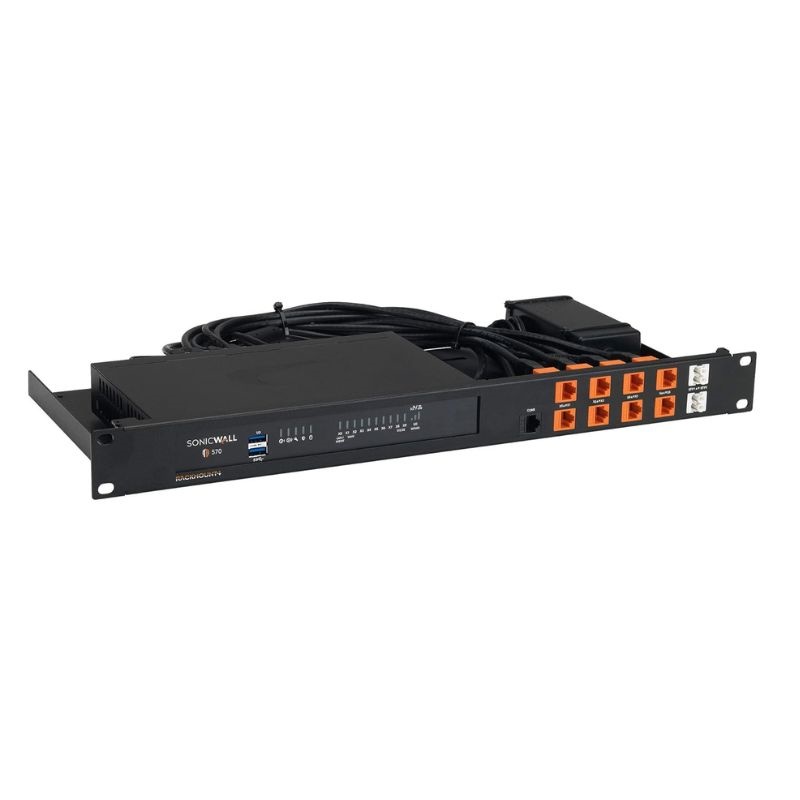
Physical design matters. The compact chassis commonly fits on a shelf or in a shallow rack tray, aiming for low power draw and quiet operation suitable for office environments. Powered by multi-core processors and specialized acceleration for cryptography and pattern matching, the appliance enforces policy at wire-speed under typical branch loads.

Interface Layout and Port Assignments

  • Multiple LAN Ports: Provide direct connectivity for departments, printers, VoIP phones, and servers.
  • Configurable WAN Ports: Assign several ports as WAN to support dual or triple ISP strategies.
  • Dedicated DMZ: Isolate public-facing services like web portals, mail gateways, or APIs.
  • Optional Aggregate Links: Use LACP (802.3ad) to bond ports for higher throughput toward core switches.
  • Console and USB: Facilitate local provisioning, backups, and emergency access.

VLANs and Virtual Interfaces

Even with many physical ports, virtual interfaces are essential. VLANs allow further segmentation on uplinks to managed switches. Tagged subinterfaces can represent department networks, production vs. development, or PCI-scoped systems. Policies then target inter-VLAN flows with precision, applying inspection profiles and logging per segment.

Power Efficiency and Environmental Considerations

Modern appliances are designed with energy-efficient chipsets and intelligent cooling. Many offices deploy them on open shelves; low acoustic output matters in such settings. Thermal design ensures sustained throughput under load without throttling, and internal sensors monitor temperature for alerting.

Deployment Scenarios and Reference Designs

The Dell AB292095 TZ570 14-port Gigabit Ethernet NGFW fits a variety of topologies. Below are common patterns and the reasoning behind them.

Distributed Enterprise Branch

Branches balance user productivity with central oversight. The appliance terminates VPNs back to the core, applies identical policy templates from headquarters, and provides local internet breakout for SaaS along SD-WAN rules. Onboarding a new branch can be as simple as shipping the unit, plugging in ISP and LAN cables, and letting zero-touch registration pull down the appropriate configuration.

Retail and Hospitality

Point-of-sale environments need strong segmentation between payment systems, guest Wi-Fi, back-office PCs, and IoT devices like kiosks and digital signage. With 14 ports, each functional group receives its own zone, supporting PCI DSS requirements such as restricted access, logging, and change control. Content filtering prevents risky browsing from the guest network from affecting cardholder data zones.

Professional Services and Creative Agencies

Agencies mix large file transfers, cloud collaboration, and client-specific access rules. Administrators can reserve a port for each client VLAN or staging server, limit data exfiltration by destination, and prioritize video conferencing during busy working hours. SSL inspection policies can exclude privacy-sensitive destinations while scanning the remainder for malware.

Light Industrial and OT Edge

Operational technology often includes legacy protocols and devices with limited native security. By segmenting controllers, sensors, and HMIs behind dedicated ports and applying tight allow-lists, the appliance reduces the blast radius of any compromise. Application control and IPS rules tuned for industrial protocols help detect misuse or scanning behavior.

Security Controls and Best Practices in This Category

Beyond raw features, outcomes depend on configuration discipline. The following best practices are broadly recommended when deploying a 14-port Gigabit NGFW.

Principle of Least Privilege

  • Create explicit allow policies between zones rather than broad permit rules.
  • Use application objects instead of open port ranges.
  • Bind policies to user groups and device types wherever possible.

SSL/TLS Decryption Strategy

Document which categories require decryption for inspection and which must be exempted for regulatory or privacy reasons. Deploy internal certificate authorities for smooth endpoint trust, and stage rollouts with pilot groups to measure user impact.

Threat Prevention Profiles

  • Enable IPS with balanced policies that block high-confidence signatures and log lower-confidence detections for review.
  • Apply gateway anti-malware to web and email protocols, and route unknown files to sandbox analysis when available.
  • Turn on DNS filtering to intercept command-and-control lookups and typosquatted phishing domains.

Change Management and Auditing

Adopt a ticketed change process, snapshot configurations before edits, and maintain a documented map of port assignments, VLANs, and policy objects. Use role-based access to delegate routine tasks without exposing sensitive settings.

Backup, HA, and Business Continuity

Schedule encrypted configuration backups to off-device storage. For critical sites, pair appliances in high-availability mode. Test failover during maintenance windows and validate that monitoring systems and logs remain intact throughout transitions.

Performance Considerations for Gigabit-Dense Firewalls

Throughput ratings differ between raw forwarding and full threat inspection. Real-world performance depends on packet sizes, application mix, and whether TLS decryption is active. Appliances in this class typically include hardware acceleration for AES and SHA operations, as well as optimized pattern-matching engines for IPS. Smart queuing and flow offload keep latency low even during spikes.

Latency, Jitter, and User Experience

For voice and video, stable latency and minimal jitter are essential. Enable application-aware QoS and path selection to route collaboration apps on the cleanest links. Monitor MOS scores where available and continuously tune shaping rules to maintain call quality during heavy downloads or backups.

Diagnostics and Troubleshooting Toolkit

  • Packet Capture: Targeted captures per zone or policy help verify NAT, routing, and inspection behavior.
  • Flow Analytics: Session tables reveal top talkers, stalled connections, and asymmetric flows.
  • Health Monitoring: Alerts for high CPU, memory pressure, link flaps, and temperature margins.
  • Log Correlation: Quick filters by user, IP, application, or rule allow rapid incident triage.

Compliance, Governance, and Risk Management

Organizations across finance, healthcare, education, and retail must meet regulatory obligations. A 14-port NGFW helps implement controls such as segmentation, strong authentication, logging, and change management. With built-in reporting and export to SIEMs, security teams can demonstrate that policies are enforced and alerts are investigated promptly.

Data Protection and Privacy Controls

Content filtering and DLP-adjacent features (where available) can restrict uploads to unsanctioned clouds, flag sensitive document types, and block outbound connections to known exfiltration hosts. For privacy, decryption rules should honor legal exemptions and minimize inspection for personal categories while still preventing malware and phishing.

Incident Response Integration

Firewalls form a crucial sensor and enforcement layer in incident response. Automated actions—quarantine a host, block an indicator, or throttle a suspect application—shorten dwell time. APIs let SOAR platforms orchestrate these responses based on alerts from endpoint agents, email security, or threat intel feeds.

Use-Case Playbooks Leveraging the Dell AB292095 TZ570 Category

Secure Guest Access Without Risk to Core Systems

Assign a dedicated interface to a guest VLAN, enable bandwidth caps, and restrict guests to the public internet only. Apply web filtering to curb malicious downloads and phishing. This protects internal resources while preserving a friendly visitor experience.

VPN Hub for Remote Workforce

Provision a reliable remote access portal using SSL/TLS with multi-factor authentication. Create groups for employees and contractors with different access scopes and time-based restrictions. Enforce posture checks to ensure endpoints have active anti-malware and disk encryption before granting access.

Branch SD-WAN with Cloud Breakout

Connect dual ISPs to two WAN ports. Define application SLAs for SaaS and collaboration, and let the firewall steer sessions to the healthiest path. Send low-risk web traffic directly to the internet while routing critical internal applications over IPSec back to headquarters.

Micro-Segmentation for Sensitive Departments

Use multiple LAN ports to create distinct zones for finance, HR, engineering, and labs. Restrict inter-zone traffic to documented business needs only. Enable TLS decryption and IPS between zones to catch threats that bypass perimeter defenses.

Capacity Planning and Interface Mapping Guide

Thoughtful port mapping reduces complexity. A simple approach is to dedicate fixed ranges: ports 1–4 for LAN segments, ports 5–6 for WAN circuits, port 7 for DMZ, ports 8–10 for IoT/OT, and remaining ports reserved for growth or temporary projects. Name interfaces clearly and mirror the naming convention in policy objects. Document cabling and keep a diagram accessible for technicians.

NAT, Routing, and DNS Strategy

Most branch deployments use outbound NAT for internet access. For inbound services, leverage static NAT with tight ACLs and WAF-like rules if publishing web applications. Configure DNS security to block malicious lookups and accelerate SaaS resolutions via optimized resolvers. Monitor for split-DNS misconfigurations that cause intermittent failures.

IPv6 Adoption Considerations

As IPv6 usage grows, ensure that policies, NAT64/DNS64 (if needed), and logging accommodate dual-stack environments. Apply identical security posture to both protocol families to avoid blind spots. Test third-party integrations—such as identity providers and monitoring tools—for v6 awareness.

Operational Excellence Checklist

  • Maintain an authoritative inventory of interfaces, subnets, VLAN IDs, and object groups.
  • Use change windows with pre- and post-checks: throughput, latency, VPN status, and policy hit-counts.
  • Automate backups and verify restore procedures quarterly.
  • Review top blocked threats weekly; tune signatures and rules to reduce noise.
  • Rotate admin credentials regularly; prefer SSO with MFA where supported.
  • Train helpdesk to interpret common alerts and escalate with proper context.

Optimization Tips for 14-Port Gigabit Firewalls

Balancing Decryption and Performance

Start with decryption on high-risk categories and sensitive user groups to measure impact. Gradually expand coverage as hardware headroom allows. Exclude known good services that break under inspection or carry confidential data subject to legal restrictions. Use certificate pinning exception lists judiciously and monitor bypass rules for abuse.

Fine-Tuning IPS and Malware Policies

Run IPS in a monitor-then-block mode during initial deployment to identify legitimate but unusual traffic. After several business cycles, move high-confidence signatures to block and leave ambiguous signatures in alert with scheduled review. For gateway anti-malware, ensure real-time updates are enabled and that the firewall can reach its signature repositories.

Leveraging Traffic Intelligence

Dashboards and reports reveal shadow IT, risky browser extensions, and bandwidth hogs. Use this intelligence to negotiate acceptable-use policies with stakeholders and to guide QoS tuning. If the organization adopts a new SaaS platform, create explicit application objects and monitoring widgets before broad rollout.

Security Hardening Recommendations

  • Disable unused interfaces or place them in a no-route quarantine zone.
  • Restrict management access to a dedicated port and management subnet.
  • Enforce MFA for administrators and rotate API keys regularly.
  • Enable automatic firmware notifications and follow a tested upgrade cadence.
  • Use deny-by-default inter-zone policies with explicit, documented exceptions.
  • Set rigorous logging on critical rules; store logs off-box with retention aligned to policy.

Comparative Considerations Within the Category

When comparing appliances similar to the Dell AB292095 TZ570, evaluate real-world performance under full security services, not just raw throughput. Consider SD-WAN features, VPN scalability, logging depth, centralized management capabilities, and licensing transparency. Examine the number of dedicated ports, availability of link aggregation, and options for HA. Test usability in the policy editor, report builder, and troubleshooting consoles—these operational factors often matter as much as headline speeds.

Evaluating Security Efficacy

Look for regularly updated threat intelligence, rapid signature delivery, and proven sandbox evasion handling. Assess how the platform detects command-and-control traffic, living-off-the-land techniques, and domain generation algorithms. The ability to correlate multiple weak signals into a strong verdict reduces false negatives while keeping noise manageable.

Operational Fit and Ecosystem

Confirm integrations with your identity provider, SIEM, SOAR, endpoint protection, and ticketing systems. A firewall that slots neatly into existing workflows accelerates incident response and reduces administrative overhead. API maturity, documentation quality, and community adoption are reliable signals of long-term ecosystem health.

Practical Checklist for Buyers and Implementers

  • Define segmentation goals: which departments or devices warrant dedicated ports or VLANs?
  • Quantify traffic profiles: encrypted web, file transfers, video conferencing, VoIP, and backups.
  • Set availability objectives: is a single appliance sufficient, or is an HA pair required?
  • Map regulatory requirements: logging retention, data categories, decryption exemptions.
  • Plan SD-WAN strategy: identify circuits, SLAs, and path selection policies.
  • Model VPN needs: concurrent users, peak hours, and partner tunnels.
  • Establish monitoring: dashboards, alerts, and SIEM forwarding with tested parsers.

Glossary of Terms Used in This Category

  • NGFW: Next-Generation Firewall; a firewall with deep packet inspection and application awareness.
  • IPS: Intrusion Prevention System; blocks known exploits and protocol misuse.
  • SD-WAN: Software-Defined Wide Area Network; optimizes traffic paths over multiple circuits.
  • DMZ: Demilitarized Zone; a network segment for public-facing services isolated from internal LANs.
  • VLAN: Virtual LAN; logical segmentation on a physical network.
  • QoS: Quality of Service; prioritization and shaping of network traffic.
  • MFA: Multi-Factor Authentication; a stronger login process requiring multiple proofs of identity.
  • HA: High Availability; redundancy design to minimize downtime.

Security Posture Maturity Journey

Stage 1: Foundational Controls

Deploy basic zone-based policies, enable IPS and anti-malware, and set up logging and backups. Document interface assignments and ensure stable WAN connectivity.

Stage 2: Visibility Expansion

Turn on application control, implement identity-aware rules, and onboard SIEM correlation. Begin TLS decryption for specific categories.

Stage 3: Optimization and Automation

Adopt SD-WAN steering, refine QoS, and build automated workflows through APIs. Integrate with SOAR for rapid response, and conduct tabletop exercises that include firewall-driven containment actions.

Stage 4: Continuous Improvement

Use metrics—mean time to detect, block rates, user impact—to guide iterative policy tuning. Stay current with emerging threats and industry guidance, adjusting inspection and segmentation where needed.

Accessory and Ecosystem Considerations

  • Uninterruptible Power Supply (UPS): Shields the appliance from power disturbances and gives time for graceful shutdowns.
  • Console Cable and Crash Cart: Speeds recovery in rare lockout scenarios.
  • Labeling Kits: Maintain clear documentation for ports, VLANs, and cables.
  • Out-of-Band Management Path: Optional cellular or secondary link for remote recovery during major outages.

Strategic Advantages of the Dell AB292095 TZ570 14-Port NGFW Category

This category excels at bringing enterprise-grade security to branch footprints without demanding complex chassis or add-on modules. The abundant Gigabit ports make segmentation approachable, while next-generation inspection prevents modern threats across encrypted and plain-text channels. Integrated SD-WAN ensures applications find the best path, and comprehensive logging informs security operations. The result is a single, unified control point where protection, performance, and manageability converge—suited to organizations standardizing on consistent security across distributed sites.

Features
Manufacturer Warranty:
None
Product/Item Condition:
Factory-Sealed New in Original Box (FSB)
ServerOrbit Replacement Warranty:
1 Year Warranty