
(7% discount is applied at checkout)
Cart is empty
Your go-to destination for cutting-edge server products
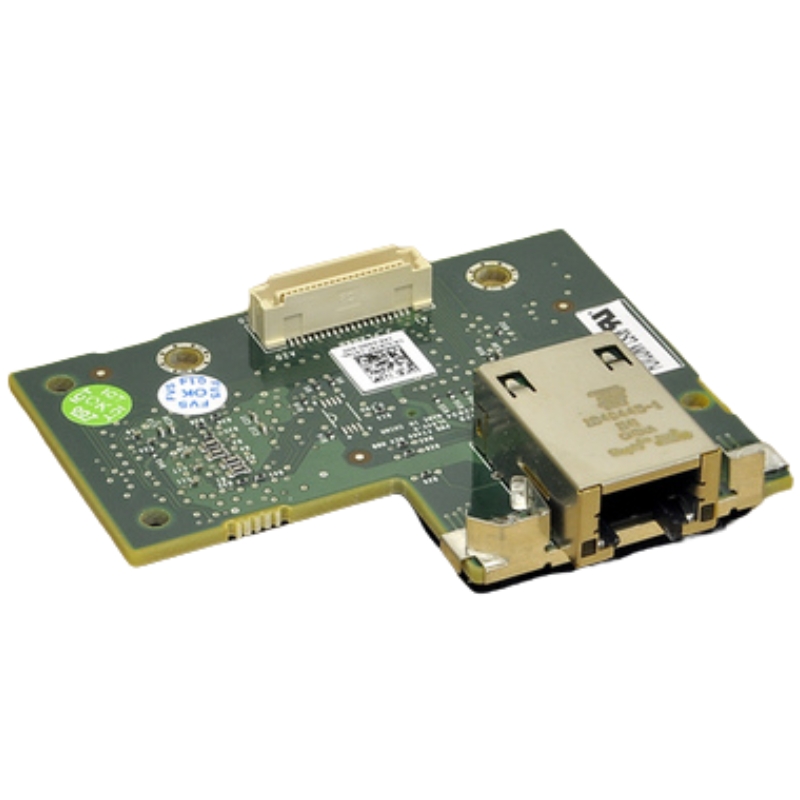
Dell J675T Idrac 6 Enterprise For Poweredge R610/ R710 Remote Access Management Card. Excellent Refurbished with 1 year replacement warranty
The Dell J675T iDRAC6 Enterprise is a powerful remote access management card engineered specifically for Dell PowerEdge R610 and R710 servers. Designed to offer full remote server management capabilities, the iDRAC6 Enterprise card provides system administrators with tools to monitor, maintain, and manage servers from virtually anywhere—without the need for physical access to the data center.
Optimized for Data Center Efficiency
The Dell J675T iDRAC 6 Enterprise module is a purpose-built remote management card designed for out-of-band administration of Dell PowerEdge R610 and R710 servers. As a compact embedded management controller, this card provides persistent, independent access to server hardware regardless of the host operating system state. Targeted at system administrators, data center engineers, and managed service providers, the J675T delivers a suite of remote-management capabilities that accelerate troubleshooting, improve uptime, and simplify routine maintenance.
Out-of-band management: Full access independent from the host OS for console redirection, hardware monitoring, and power control.
Virtual media and console: Mount ISO images or local drives remotely and use KVM-over-IP to interact with the system as if you were physically present.
Hardware-level monitoring: Sensor monitoring for temperatures, voltages, fans, and other critical server health metrics.
Remote power control: Remote power on, off, and forced reset capabilities — enabling rapid recovery and scheduled reboots.
Dedicated management network: Isolate management traffic from production networks for improved security and reliability.
Event logging and alerting: System Event Log (SEL) capture and SNMP traps for integration into monitoring platforms.
The J675T iDRAC 6 Enterprise card is explicitly compatible with the Dell PowerEdge R610 and R710 series. These server platforms are commonly used in enterprise, virtualized, and high-density hosting environments. When shopping for this module, ensure the following compatibility checks:
Server model: Dell PowerEdge R610 or R710.BIOS and system firmware: Verify minimum BIOS revisions recommended by Dell for iDRAC 6 support.
Physical slot and connector: Confirm the server’s iDRAC connector version and the card’s form factor.
Power and thermal constraints: Confirm chassis supports additional management modules if other add-ons are installed.
Because R610 and R710 are established generation platforms, some refurbished or aftermarket servers may require firmware updates or minor hardware adjustments to operate smoothly with J675T modules. Always check vendor notes or product listings for preinstalled firmware levels and whether the card has been factory-configured or requires onsite configuration.
Understanding the technical specification helps administrators plan deployment, network segmentation, and lifecycle management. Below are the typical specifications and capabilities associated with the Dell J675T iDRAC 6 Enterprise card:
Interface: Dedicated management NIC (10/100/1000 supported depending on server backplane and exact module revision).
Access methods: Web-based GUI, SSH, RACADM CLI, IPMI (where applicable), and virtual KVM/virtual media support.
Security features: HTTPS for secure web GUI, user role-based access control, local user accounts, and configurable password policies.
Event and sensor monitoring: Comprehensive logging of chassis, power supply, fan, temperature, and memory errors to the System Event Log (SEL).
Remote console: Java-based or HTML5-capable virtual console depending on firmware level; supports keyboard, video, and mouse (KVM).
Firmware update path: Upgradable via the GUI, Dell Lifecycle Controller, or manual methods using virtual media or RACADM.
Virtual media functionality allows administrators to remotely attach ISO images or local optical drives for OS installation and repair. The card supports both CD/DVD image mounting and USB redirection, enabling remote deployments and recovery operations without physical access to the server.
Virtual media and remote mounting of installation media make it straightforward to provision systems across multiple racks and sites. For small and medium data centers that lack onsite staff, J675T empowers centralized images and scripted installations.
Administrative access can be restricted by role, logging is available for user actions, and remote management traffic can be isolated on a dedicated network segment. These controls contribute to compliance-focused environments where separation of duties and secure management paths are required.
Dell’s iDRAC family includes multiple editions; J675T represents the Enterprise level for iDRAC 6. Understanding the differences helps determine if Enterprise features justify the investment.
Full KVM-over-IP and virtual media support for remote OS install and troubleshooting. Advanced alerting, secure remote console, and expanded user management capabilities.
Suitable for environments requiring out-of-band OS-level access and comprehensive hardware control.
Express or base iDRAC variants typically provide limited functionality: basic health monitoring, remote power control, and serial-over-LAN features but may lack virtual KVM and virtual media. For many headless or agent-managed environments, Express can be sufficient and more cost-effective; however, Enterprise is the clear choice when full remote remediation is a requirement.
The J675T iDRAC 6 Enterprise card finds a natural fit in various environments. Here are common deployment patterns and how the module adds value.
Large-scale data centers use iDRAC modules to centralize console access, reduce travel time, and enable rapid recovery during incidents. iDRAC integrates with remote management consoles and orchestration tools to automate routine tasks like firmware rollouts and scheduled reboots.
For organizations without onsite IT staff 24/7, iDRAC’s virtual media and power control allow offsite engineers to perform critical repairs and OS reinstallations, significantly reducing recovery time outside normal business hours.
Engineering teams use iDRAC modules to automate test cycles, rapidly reimage servers, and capture boot logs for debugging during development and QA cycles.
One of the standout features of the Dell J675T iDRAC6 Enterprise card is its compatibility with the Dell PowerEdge R610 and R710 series. These popular servers are widely used in enterprise environments due to their performance, reliability, and scalability. The J675T card enhances these systems by delivering advanced KVM (Keyboard, Video, Mouse) over IP functionality, virtual media capabilities, and out-of-band management options for seamless server control even during hardware or OS failures.
Deploying the Dell J675T iDRAC6 Enterprise card across a server infrastructure provides numerous operational advantages. These benefits are especially critical for large-scale enterprises, data centers, and managed service providers seeking reliable, efficient server management solutions.
One of the most compelling benefits of the iDRAC6 Enterprise module is its ability to reduce server downtime. By enabling remote diagnostics and troubleshooting, administrators can quickly resolve issues without waiting for on-site technicians.
Administrators can perform system reboots, BIOS configuration, and OS installations remotely, eliminating the need for physical intervention. This translates to significant time and cost savings, particularly in geographically dispersed data centers.
The iDRAC6 Enterprise includes security features such as SSL encryption, user authentication, and audit logging. These capabilities are essential for maintaining compliance with industry standards like HIPAA, SOX, and PCI DSS.
The Dell iDRAC6 Enterprise card supports a wide array of applications and deployment scenarios, making it ideal for various industries and IT environments.
In large data centers where hundreds or thousands of servers must be managed remotely, iDRAC6 provides centralized control that reduces the need for onsite personnel and accelerates issue resolution.
MSPs use iDRAC cards to manage client infrastructure securely and efficiently. The ability to perform remote reboots and software installations without interrupting client operations is a significant competitive advantage.
For branch offices or remote locations where IT support is minimal, iDRAC6 allows centralized IT teams to maintain full server control without traveling on-site.


 Contact Us
 Information
 Catalog
 Solid State Drives (SSD)
 Network Switches
 Hard Disk Drives
 HBA & Controllers
 PC & Servers
 PC & Server Memory
 CPU & Processors
 Network Routers
 Power Supplies
 Tape Drives & Libraries
 Network Devices
 Computer & Network Cables